Mutant Testing A QA Engineer’s Honest Experience With Smarter Testing

I still remember the day I first came across the term Mutant Testing. It popped up in a technical discussion, and for a moment, I thought someone was joking. “Mutation? Like genetics?” But once I dug deeper, it changed the way I evaluate test cases—even after years of living and breathing software quality assurance.

Mutant testing didn’t just teach me about code strength.
It taught me something about the assumptions we quietly carry in our work.


🔍 What Mutant Testing Really Means

Think of mutation testing as a smart way of challenging your test suite.

You take a piece of working code, create small intentional changes—called mutants—and then run your test cases to see if they catch the errors.

It’s like checking your home security system by trying different “fake break-ins” to see if the alarm works.

For example, suppose the original code is:

if (age > 18)

A mutant might be:

if (age >= 18)

Now you ask:
Do your tests detect this as wrong?
If the answer is no, that means your test suite isn’t strong enough—even if it looks complete on paper.


🧪 My First Real Experience With Mutant Testing

Years ago, we were preparing a system for a major release. The team trusted our regression suite because it had grown over many sprints. Automation scripts were stable, and manual tests were documented neatly.

Yet something didn’t feel right. The green passing results felt too… easy.

That’s when I decided to try mutant testing on one module. I didn’t use a tool at first—I manually created small code variations just to experiment.

When I ran the tests, several mutants survived.

Not one or two.
Enough to make me pause and rethink.

Some mutants were simple logic flips. Others were boundary changes. The results showed us one clear truth:

We had test cases, but we didn’t have strong coverage.
That’s the day I realized how mutation testing “humbles” even the most experienced QA engineer.


🎯 What Mutant Testing Revealed About Our Tests

The surviving mutants highlighted things we didn’t see during routine test writing:

✔ 1. Missing Negative Cases

Many tests validated only the happy path.
When we flipped conditions (like > to >=), tests passed quietly.

✔ 2. Weak Assertions in Automation

The UI tests walked through the correct flows, but our assertions were too soft.
The tests said “Pass” even when logic behind the UI changed.

✔ 3. Boundary Blind Spots

For example, a discount logic:

if (amount >= 1000)

When mutated to:

if (amount > 1000)

our tests didn’t catch the difference because we didn’t test at exactly 1000.

✔ 4. Overconfidence

We assumed certain parts of the code were too “simple” to break.
The mutants proved how dangerous assumptions can be.

Mutant testing didn’t just expose gaps—it improved our mindset.


🛠 Can Mutant Testing Be Done Manually? Absolutely.

You don’t need fancy tools to understand mutation testing.
In fact, my very first experiment was done manually.

Here’s how you can do it yourself:

  1. Pick a small piece of logic.
  2. Change one operator, condition, or value.
  3. Run your existing test cases.
  4. See whether they fail.

If they fail → your test suite “killed” the mutant.
If they pass → the mutant “survived,” meaning your tests need improvement.

Manual Mutation Example

Original code:

if (score == 50)
    grade = "Pass";

Manual mutant:

if (score != 50)
    grade = "Pass";

If your tests don’t catch this, you’re missing critical negative tests.

When Manual Testing Works

  • Small modules
  • Critical calculations
  • Teaching junior testers
  • Quick validation before writing automation

When Manual Testing Fails

  • Large projects
  • Frequent code changes
  • CI/CD environments
  • Time-sensitive releases

This is where automated mutation testing tools shine.


⚙️ Tools That Bring Mutation Testing to Life

If you want to automate mutation testing (and save yourself hours), here are great tools:

  • Stryker.NET (C#/.NET)
  • PIT / Pitest (Java)
  • MutPy (Python)
  • Cosmic Ray (Python)
  • Major (Java)

Among these, Stryker.NET is my go-to because of its clean dashboard and simple CI integration. It visually shows which mutants were killed, which survived, and how strong your test suite truly is.


💡 A Little Story: How One Mutant Saved Us

During one release cycle, a small change was introduced in a permission rule.
A mutant flipped the condition from:

if(hasAccess)

to:

if(!hasAccess)

Shockingly, our test suite didn’t notice.

When investigating, we realized the logic itself had a deeper flaw—and would have caused real access issues for users.

The mutant didn’t just survive.
It exposed a real production bug we had overlooked.

After that, even developers started appreciating mutation results.
Mutant testing slowly became part of our quality culture.


🧠 Lessons Mutant Testing Taught Me About QA

Over the years, this technique shaped how I think about quality:

✔ Strong code coverage doesn’t guarantee strong testing

Mutation score tells the real story.

✔ Negative tests matter more than we think

Most surviving mutants point directly to missing negative cases.

✔ Assertions must be meaningful

Not just “page loaded,” but “logic validated.”

✔ Quality grows when we challenge assumptions

Mutant testing forces you to think like a real bug.

✔ A weak test suite is more dangerous than a bug

Because it gives a false sense of safety.


🚀 How You Can Start With Mutant Testing

Here’s a simple roadmap I always recommend:

  1. Start with one module—not the whole system.
  2. Focus on small logical blocks or critical business rules.
  3. Run mutants manually or with tools.
  4. Review every survivor with developers.
  5. Strengthen your test cases intentionally.
  6. Add mutation testing into CI once stable.
  7. Track mutation score just like code coverage.

You’ll see improvements quickly—sometimes within a single sprint.


🔚 Final Thoughts

Mutant testing isn’t just a technique.
It’s a mindset.

It pushes you to think deeper, write smarter test cases, and remove overconfidence from your QA process. Whether you try it manually or with tools, it reveals blind spots that traditional testing often misses.

If you’re serious about improving test quality—not just expanding the number of test cases—mutation testing is one of the most powerful steps you can take.
Why “QA Automation Engineer” Is a Misleading Job Title in Software Testing

In recent years, I keep noticing job ads from big companies and even LinkedIn profiles with titles such as “QA Automation Engineer,” “QA Tester,” or “QA Engineer.” At first glance, these sound professional, but when you actually read the job descriptions, they are mostly about software testing—which belongs to Quality Control (QC), not Quality Assurance (QA).

This shows how sometimes, in the software industry, we get so caught up in trends and titles that we forget the basics. And when fundamentals get blurred, both professionals and organizations suffer. Let’s break this down in very simple, user-friendly terms.


What is Quality Assurance (QA)?

Quality Assurance is about the process.

  • QA ensures that the right processes are being followed during software development.
  • It’s proactive—designed to prevent problems before they happen.
  • QA activities include process audits, reviewing compliance with industry standards (like CMMI, ISO, Automotive SPICE), and driving process improvements.
  • QA is applied across all Software Development Life Cycle (SDLC) activities—not just at the testing phase.

👉 In short, QA = Making sure the way you build software is correct and consistent.


What is Quality Control (QC)?

Quality Control is about the product.

  • QC focuses on the actual software being built.
  • It’s reactive—it comes after development, to detect problems that already exist.
  • QC includes software testing—manual or automated—to find bugs, defects, or deviations from requirements.
  • This is where roles like Test Engineer or Test Automation Engineer make sense.

👉 In short, QC = Making sure the software product works as expected and meets quality standards.


QA vs QC – The Simple Difference

  • QA is proactive: It prevents issues before they happen by focusing on processes.
  • QC is reactive: It detects issues after they happen by testing the final product.

Think of it this way:

  • QA is like ensuring your recipe and cooking method are correct before you start cooking.
  • QC is tasting the food after cooking to see if it came out right.

Both are essential, but they are not the same.


Why “QA Automation Engineer” Doesn’t Make Sense

Now comes the important part. Can you automate QA activities like process audits, compliance checks, or organizational improvements? Not really. Those are human-driven, analytical, and often organizational tasks.

But you can automate QC activities—like running regression tests, smoke tests, or performance checks. That’s where the correct title is Test Automation Engineer (or sometimes Automation Test Engineer).

So, when companies use the title “QA Automation Engineer”, it’s misleading because:

  • The role is about QC (testing), not QA.
  • Automation applies to testing, not assurance.
  • It confuses new professionals in the industry about what QA really means.

Why Misusing Job Titles is a Big Problem

When job titles don’t reflect actual responsibilities, it creates multiple issues:

  1. Confusion for new professionals – Freshers think QA means testing only, missing the bigger picture of process assurance.
  2. Wrong expectations – Companies may hire testers but expect them to improve processes, which isn’t their role.
  3. Career development issues – Professionals label themselves incorrectly, which can affect recognition and future opportunities.
  4. Industry credibility – If we can’t even define our roles correctly, it signals weak fundamentals in software quality practices.

The Correct Way to Define Roles

  • If your role is mainly testing, call yourself a Test Engineer or Test Automation Engineer.
  • If your role involves auditing processes, compliance, and quality standards, then QA Engineer is accurate.
  • Avoid mixing QA and QC—because while they are related, they are not interchangeable.

Final Thoughts

At the end of the day, words matter. If you are a professional, you should use a job title that correctly represents your role. If you are a company, please stop posting misleading job titles that confuse the industry.

Remember:

  • QA = Process, proactive, prevents problems.
  • QC = Product, reactive, finds problems.

There is no such thing as a “QA Automation Engineer.”
What you really mean is “Test Automation Engineer.”

If we can’t even define our own titles correctly, then we have a fundamentals problem to fix. And fixing fundamentals is the first step to building better software.

Why Shift Left Testing is a Game-Changer for QA

Software development is evolving faster than ever. Traditional quality assurance (QA) often takes place at the end of the software development lifecycle, where testers validate functionality before release. While this approach worked in the past, today’s fast-paced Agile and DevOps environments demand something more efficient. This is where Shift Left Testing becomes a game-changer.

In simple terms, Shift Left Testing means testing earlier in the development cycle—moving QA activities from the final stages of development to the very beginning. Instead of waiting for developers to finish coding, QA engineers get involved from the planning and design phases. This proactive approach not only ensures higher software quality but also reduces costs and speeds up delivery.


What Does Shift Left Testing Mean?

The term “Shift Left” refers to moving testing activities to the left side of the project timeline. In a traditional waterfall model, requirements and design happen first, development follows, and testing comes at the end. Unfortunately, late testing often leads to discovering critical bugs right before release, causing delays, rework, and cost overruns.

By shifting left, testing activities—like requirement analysis, test planning, unit testing, static code analysis, and automation—are introduced early. This approach helps teams identify and fix issues before they grow into expensive problems.


Why Shift Left Testing is a Game-Changer

1. Early Defect Detection Saves Cost and Time

Industry studies show that the cost of fixing a bug increases exponentially the later it’s found in the lifecycle. A bug discovered during requirement analysis might cost almost nothing to fix, but the same bug found in production can cost thousands of dollars and damage customer trust. Shift Left Testing ensures that issues are caught when they are cheapest and easiest to fix.


2. Improved Collaboration Between QA and Developers

Traditionally, QA and developers worked in silos—developers wrote code, and QA found bugs. Shift Left breaks down these silos. QA engineers participate in requirement discussions, design reviews, and sprint planning. This collaboration builds shared responsibility for quality and fosters a culture where developers write more testable and reliable code.


3. Faster Delivery in Agile and DevOps Environments

With Agile and DevOps, release cycles are shorter, and continuous delivery is the goal. Shift Left Testing supports this model by enabling continuous testing throughout development. Automated tests are run alongside builds, ensuring that every code change is validated quickly. This reduces bottlenecks and accelerates time-to-market.


4. Stronger Focus on Test Automation

Shift Left goes hand-in-hand with test automation. Instead of relying only on manual tests at the end, automated unit tests, API tests, and integration tests are created early. This ensures quicker feedback for developers and strengthens regression testing for future sprints. QA engineers evolve into automation specialists, boosting productivity.


5. Better Requirement Clarity and Coverage

When testers join requirement analysis sessions, they help uncover ambiguities, missing details, or unrealistic expectations early. Testers often think from an end-user perspective, which helps refine requirements. This leads to fewer misunderstandings, more complete test coverage, and ultimately a product that meets user needs better.


6. Reduced Risk of Production Failures

Shift Left Testing significantly reduces the chance of last-minute surprises. With continuous validation and early defect detection, the product is more stable by the time it reaches production. This means fewer hotfixes, fewer emergency patches, and happier customers.


7. Enhanced QA Role and Career Growth

For QA engineers, Shift Left is not just a methodology—it’s a career booster. Testers are no longer limited to “finding bugs at the end.” Instead, they play a vital role in shaping product quality from the very beginning. This shift elevates QA from being a reactive function to a proactive partner in the software development lifecycle.


Real-Life Example: How Shift Left Changed My QA Projects

In my own QA journey, implementing Shift Left has been transformative. For one project, regression testing used to take almost 8 hours after integration. By adopting automation early and involving QA in sprint planning, we reduced that effort to just 15–20 minutes. This change not only improved efficiency but also built trust between QA and developers. Bugs that previously slipped into production were now caught much earlier, improving customer satisfaction and saving costs.


Best Practices for Adopting Shift Left Testing

  • Involve QA early: Bring testers into requirement and design discussions.
  • Invest in automation: Build unit, API, and integration tests from the start.
  • Adopt CI/CD pipelines: Integrate automated tests into your build and deployment pipelines.
  • Encourage cross-team collaboration: Foster open communication between developers, testers, and product owners.
  • Focus on quality culture: Make quality everyone’s responsibility, not just QA’s.

Conclusion

Shift Left Testing is more than just a buzzword—it’s a cultural and technical shift that transforms how software quality is ensured. By detecting defects early, improving collaboration, and enabling faster delivery, Shift Left Testing has become a game-changer for QA in modern software development.

For organizations aiming to deliver high-quality products faster and at lower costs, adopting Shift Left is no longer optional—it’s essential.

Why QA Matters: From Daily Frustration to Driving Quality with Purpose

Yesterday is history, tomorrow is a mystery, but today is a gift – that’s why it’s called the present.

There are days in a QA’s life that feel like a never-ending loop of bug hunting, retesting, unclear specs, and misaligned expectations.

You know the feeling.
You’re in the middle of regression testing before release. The build arrives late, half the features are broken, and the developer casually says,

“It worked on my machine.” 😩

Meanwhile, the pressure mounts. Release deadline looms. Product managers want sign-off. And you’re the gatekeeper — protecting the end-user experience like an unsung superhero.

Some days, it’s exhausting.
Some days, you ask yourself:

“Why am I doing this again?”

But pause for a moment.
Look around.

  • That bug you caught before production? You saved thousands in potential user churn.
  • That scenario you tested no one thought about? It became a new edge case for future sprints.
  • That uncomfortable discussion you led on missed requirements? It improved collaboration across teams.

QA isn’t just about finding faults.
It’s about building trust, ensuring safety, and protecting quality.
Even if you don’t always get the credit, your work matters.

So if today feels like a battle —
If your efforts feel overlooked —
If you’re stuck testing the same issue for the third time —

Breathe. Reflect. Reset.

Because:

🕰 Yesterday is history — the bugs, the delays, the miscommunication. Learn and let go.
🧩 Tomorrow is a mystery — new features, new challenges, maybe new praise. Embrace the unknown.
🎁 But today is a gift — a chance to raise the bar, to speak up, to improve one pixel more.

You are not just a tester.
You are a guardian of experience.
A voice for the user.
A compass for the team.

So rise again, QA.
Not because it’s easy.
But because quality deserves a champion like you.

What Is Shift-Left and Shift-Right Testing? Explained Simply

In the world of software development, two popular testing strategies are gaining attention: Shift-Left Testing and Shift-Right Testing. These terms may sound a little technical, but don’t worry! In this blog, we’ll break them down in a very simple way.


🔄 What Do “Shift-Left” and “Shift-Right” Mean?

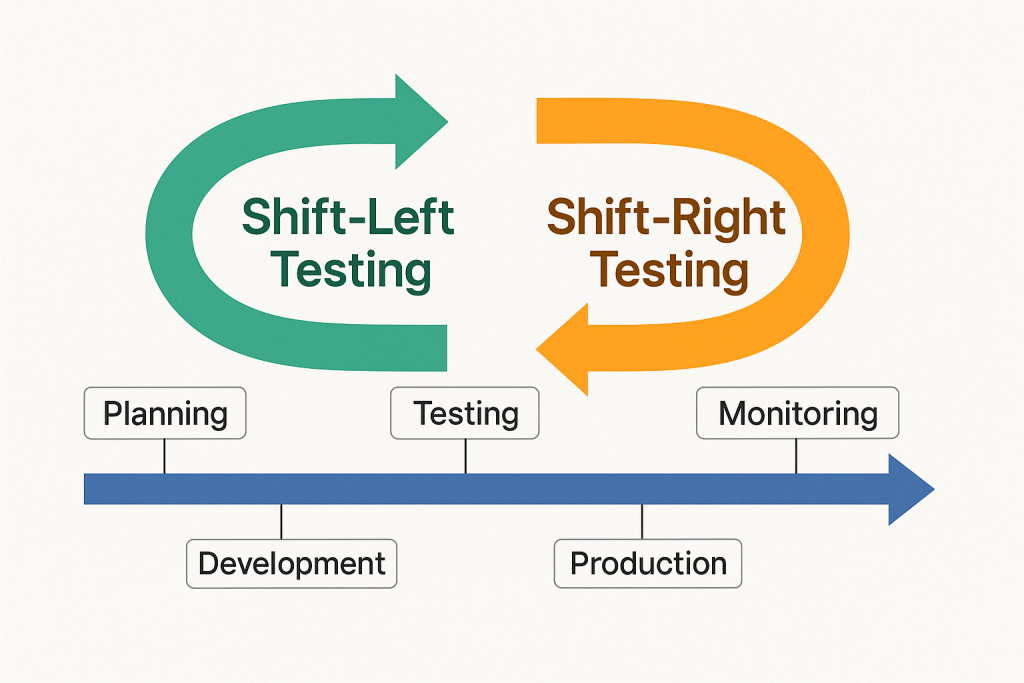
Imagine software development as a timeline — it starts with planning and ends with releasing the product to users.

  • Left side = Early stages like planning, designing, and coding
  • Right side = Later stages like deployment, user feedback, and maintenance

So when we say:

  • Shift-Left Testing ➜ Move testing earlier in the process
  • Shift-Right Testing ➜ Continue testing after release into production

🧭 Shift-Left Testing: Catching Bugs Early

What is it?
Shift-Left means testing begins before the software is fully built. It’s like checking your ingredients while cooking instead of waiting until the dish is finished.

Why is it useful?

  • Bugs are cheaper and easier to fix early
  • Developers get faster feedback
  • Improves product quality from the beginning

Common Practices:

  • Unit testing
  • Static code analysis
  • Test-driven development (TDD)
  • Continuous integration testing

Example:
A developer writes test cases while writing the code itself. If anything breaks, it’s caught immediately.


🧭 Shift-Right Testing: Keeping an Eye After Launch

What is it?
Shift-Right means testing continues after the software is released. Think of it as checking how your car performs on the road, not just in the garage.

Why is it useful?

  • Real users often behave differently than testers
  • Helps monitor performance in real-world conditions
  • Allows testing for scalability, reliability, and security

Common Practices:

  • A/B testing
  • Real user monitoring (RUM)
  • Synthetic testing
  • Chaos engineering

Example:
A website team monitors how users interact with a new feature after it’s live. If something slows down, they catch and fix it quickly.


🔍 Shift-Left vs Shift-Right: What’s the Difference?

FeatureShift-Left TestingShift-Right Testing
Focus TimeEarly (during development)Late (after release)
Main GoalPrevent bugs earlyDetect issues in production
Tools UsedUnit tests, CI pipelinesMonitoring, A/B testing
Feedback FromDevelopers, QA teamsEnd users, system logs

✅ Which One Should You Use?

Both!
The best teams use Shift-Left to build quality and Shift-Right to ensure reliability in the real world.

Just like a good chef tastes while cooking (left) and gets feedback after serving (right), a smart software team tests both before and after release.


🧠 Final Thoughts

Shift-Left and Shift-Right testing aren’t buzzwords — they’re smart strategies to create better, faster, and safer software. By adopting both, you catch problems early and keep learning from real-world use.

Quality isn’t just a step — it’s a journey from start to finish.