Why “QA Automation Engineer” Is a Misleading Job Title in Software Testing

In recent years, I keep noticing job ads from big companies and even LinkedIn profiles with titles such as “QA Automation Engineer,” “QA Tester,” or “QA Engineer.” At first glance, these sound professional, but when you actually read the job descriptions, they are mostly about software testing—which belongs to Quality Control (QC), not Quality Assurance (QA).

This shows how sometimes, in the software industry, we get so caught up in trends and titles that we forget the basics. And when fundamentals get blurred, both professionals and organizations suffer. Let’s break this down in very simple, user-friendly terms.


What is Quality Assurance (QA)?

Quality Assurance is about the process.

  • QA ensures that the right processes are being followed during software development.
  • It’s proactive—designed to prevent problems before they happen.
  • QA activities include process audits, reviewing compliance with industry standards (like CMMI, ISO, Automotive SPICE), and driving process improvements.
  • QA is applied across all Software Development Life Cycle (SDLC) activities—not just at the testing phase.

👉 In short, QA = Making sure the way you build software is correct and consistent.


What is Quality Control (QC)?

Quality Control is about the product.

  • QC focuses on the actual software being built.
  • It’s reactive—it comes after development, to detect problems that already exist.
  • QC includes software testing—manual or automated—to find bugs, defects, or deviations from requirements.
  • This is where roles like Test Engineer or Test Automation Engineer make sense.

👉 In short, QC = Making sure the software product works as expected and meets quality standards.


QA vs QC – The Simple Difference

  • QA is proactive: It prevents issues before they happen by focusing on processes.
  • QC is reactive: It detects issues after they happen by testing the final product.

Think of it this way:

  • QA is like ensuring your recipe and cooking method are correct before you start cooking.
  • QC is tasting the food after cooking to see if it came out right.

Both are essential, but they are not the same.


Why “QA Automation Engineer” Doesn’t Make Sense

Now comes the important part. Can you automate QA activities like process audits, compliance checks, or organizational improvements? Not really. Those are human-driven, analytical, and often organizational tasks.

But you can automate QC activities—like running regression tests, smoke tests, or performance checks. That’s where the correct title is Test Automation Engineer (or sometimes Automation Test Engineer).

So, when companies use the title “QA Automation Engineer”, it’s misleading because:

  • The role is about QC (testing), not QA.
  • Automation applies to testing, not assurance.
  • It confuses new professionals in the industry about what QA really means.

Why Misusing Job Titles is a Big Problem

When job titles don’t reflect actual responsibilities, it creates multiple issues:

  1. Confusion for new professionals – Freshers think QA means testing only, missing the bigger picture of process assurance.
  2. Wrong expectations – Companies may hire testers but expect them to improve processes, which isn’t their role.
  3. Career development issues – Professionals label themselves incorrectly, which can affect recognition and future opportunities.
  4. Industry credibility – If we can’t even define our roles correctly, it signals weak fundamentals in software quality practices.

The Correct Way to Define Roles

  • If your role is mainly testing, call yourself a Test Engineer or Test Automation Engineer.
  • If your role involves auditing processes, compliance, and quality standards, then QA Engineer is accurate.
  • Avoid mixing QA and QC—because while they are related, they are not interchangeable.

Final Thoughts

At the end of the day, words matter. If you are a professional, you should use a job title that correctly represents your role. If you are a company, please stop posting misleading job titles that confuse the industry.

Remember:

  • QA = Process, proactive, prevents problems.
  • QC = Product, reactive, finds problems.

There is no such thing as a “QA Automation Engineer.”
What you really mean is “Test Automation Engineer.”

If we can’t even define our own titles correctly, then we have a fundamentals problem to fix. And fixing fundamentals is the first step to building better software.

Why Shift Left Testing is a Game-Changer for QA

Software development is evolving faster than ever. Traditional quality assurance (QA) often takes place at the end of the software development lifecycle, where testers validate functionality before release. While this approach worked in the past, today’s fast-paced Agile and DevOps environments demand something more efficient. This is where Shift Left Testing becomes a game-changer.

In simple terms, Shift Left Testing means testing earlier in the development cycle—moving QA activities from the final stages of development to the very beginning. Instead of waiting for developers to finish coding, QA engineers get involved from the planning and design phases. This proactive approach not only ensures higher software quality but also reduces costs and speeds up delivery.


What Does Shift Left Testing Mean?

The term “Shift Left” refers to moving testing activities to the left side of the project timeline. In a traditional waterfall model, requirements and design happen first, development follows, and testing comes at the end. Unfortunately, late testing often leads to discovering critical bugs right before release, causing delays, rework, and cost overruns.

By shifting left, testing activities—like requirement analysis, test planning, unit testing, static code analysis, and automation—are introduced early. This approach helps teams identify and fix issues before they grow into expensive problems.


Why Shift Left Testing is a Game-Changer

1. Early Defect Detection Saves Cost and Time

Industry studies show that the cost of fixing a bug increases exponentially the later it’s found in the lifecycle. A bug discovered during requirement analysis might cost almost nothing to fix, but the same bug found in production can cost thousands of dollars and damage customer trust. Shift Left Testing ensures that issues are caught when they are cheapest and easiest to fix.


2. Improved Collaboration Between QA and Developers

Traditionally, QA and developers worked in silos—developers wrote code, and QA found bugs. Shift Left breaks down these silos. QA engineers participate in requirement discussions, design reviews, and sprint planning. This collaboration builds shared responsibility for quality and fosters a culture where developers write more testable and reliable code.


3. Faster Delivery in Agile and DevOps Environments

With Agile and DevOps, release cycles are shorter, and continuous delivery is the goal. Shift Left Testing supports this model by enabling continuous testing throughout development. Automated tests are run alongside builds, ensuring that every code change is validated quickly. This reduces bottlenecks and accelerates time-to-market.


4. Stronger Focus on Test Automation

Shift Left goes hand-in-hand with test automation. Instead of relying only on manual tests at the end, automated unit tests, API tests, and integration tests are created early. This ensures quicker feedback for developers and strengthens regression testing for future sprints. QA engineers evolve into automation specialists, boosting productivity.


5. Better Requirement Clarity and Coverage

When testers join requirement analysis sessions, they help uncover ambiguities, missing details, or unrealistic expectations early. Testers often think from an end-user perspective, which helps refine requirements. This leads to fewer misunderstandings, more complete test coverage, and ultimately a product that meets user needs better.


6. Reduced Risk of Production Failures

Shift Left Testing significantly reduces the chance of last-minute surprises. With continuous validation and early defect detection, the product is more stable by the time it reaches production. This means fewer hotfixes, fewer emergency patches, and happier customers.


7. Enhanced QA Role and Career Growth

For QA engineers, Shift Left is not just a methodology—it’s a career booster. Testers are no longer limited to “finding bugs at the end.” Instead, they play a vital role in shaping product quality from the very beginning. This shift elevates QA from being a reactive function to a proactive partner in the software development lifecycle.


Real-Life Example: How Shift Left Changed My QA Projects

In my own QA journey, implementing Shift Left has been transformative. For one project, regression testing used to take almost 8 hours after integration. By adopting automation early and involving QA in sprint planning, we reduced that effort to just 15–20 minutes. This change not only improved efficiency but also built trust between QA and developers. Bugs that previously slipped into production were now caught much earlier, improving customer satisfaction and saving costs.


Best Practices for Adopting Shift Left Testing

  • Involve QA early: Bring testers into requirement and design discussions.
  • Invest in automation: Build unit, API, and integration tests from the start.
  • Adopt CI/CD pipelines: Integrate automated tests into your build and deployment pipelines.
  • Encourage cross-team collaboration: Foster open communication between developers, testers, and product owners.
  • Focus on quality culture: Make quality everyone’s responsibility, not just QA’s.

Conclusion

Shift Left Testing is more than just a buzzword—it’s a cultural and technical shift that transforms how software quality is ensured. By detecting defects early, improving collaboration, and enabling faster delivery, Shift Left Testing has become a game-changer for QA in modern software development.

For organizations aiming to deliver high-quality products faster and at lower costs, adopting Shift Left is no longer optional—it’s essential.

Learn Test Data Management (TDM) the Easy Way: For QA Beginners

In software testing, having the right data is just as important as having the right test cases. If you’re testing a banking app, you can’t do much without having accounts, balances, and transaction histories to work with.

This is where Test Data Management (TDM) becomes crucial.


📘 What is Test Data Management (TDM)?

Test Data Management (TDM) is the process of:

  • Creating,
  • Maintaining,
  • Storing, and
  • Using data specifically for software testing.

It ensures testers have access to clean, relevant, and secure test data that simulates real-world scenarios without affecting live systems.


🔎 Real-Life Analogy

Imagine testing an online shopping website. Here’s the kind of test data you’ll need:

  • User accounts (names, emails, passwords)
  • Products (name, price, stock count)
  • Orders (status, payment type)
  • Shipping info

Without this data, testing will either fail or give false results.


🎯 Why is Test Data Management Important?

BenefitsExplanation
🎯 Increases test accuracyWell-prepared data helps testers find real bugs.
⏱️ Saves timeTesters don’t waste time creating or searching for data.
🔐 Ensures securitySensitive info (like customer data) is hidden or masked.
🔁 Supports automationAutomated tests run better with reusable data.
⚙️ Boosts test coverageDifferent types of data (valid, invalid, edge cases) cover more scenarios.

🧪 Types of Test Data You’ll Use

TypeExamplePurpose
Valid dataCorrect username/passwordChecks positive flows
Invalid dataWrong password, invalid emailTests error handling
Boundary data0, 1, 1000 itemsTests system limits
Null valuesEmpty fieldsTests mandatory validations
Duplicate dataSame phone number or emailTests uniqueness validations

🛠️ Ways to Generate Test Data

  1. Manual Entry:
    You enter data by hand. Best for small tests.
    Example: Fill out a form with sample name, email.
  2. Copy from Production (Masked):
    Real user data copied after hiding private info.
    Example: Replace real names with fake ones, but keep structure.
  3. Data Generation Tools:
    Auto-generate data using tools or scripts.
    Examples: Faker (Python/JS), Mockaroo, SQL scripts.
  4. Automated Data Loaders:
    Write scripts to load data directly into the database.

🔐 Test Data Security: Why It Matters

  • Using real customer data in testing is risky.
  • Leaks can violate privacy laws (like GDPR).
  • Always mask or anonymize sensitive data.

✅ Best Practice: Replace “John Doe” with “TestUser001” and remove real emails or phone numbers.

🧩 Common Challenges in TDM

ChallengeExplanationTip
Data duplicationToo many copies slow down testingUse version control for data sets
Outdated dataTests may fail if data is oldAutomate regular data refresh
Environment mismatchData works in one test server, fails in anotherStandardize environments
Poor data maskingReal names, emails visibleUse masking tools or scripts

🚀 TDM Tools for Beginners

ToolUse Case
MockarooGenerate fake data (CSV, JSON, SQL)
FakerProgrammatically create data in Python/JS
Katalon TestOpsTest management + data handling
Delphix / InformaticaAdvanced data virtualization (for enterprises)
PostgreSQL/MySQL scriptsGenerate data using SQL for back-end tests

🧠 Quick Tips for Fresher Testers

  1. ✅ Use unique and clear naming in test data. (e.g., User_Test001)
  2. ✅ Always document test data used in each case.
  3. ✅ Try to reuse test data across test cycles.
  4. ✅ When in doubt, ask for sample datasets from your dev team.
  5. ✅ Learn simple data generation tools — they will save your time.

📌 TDM in Agile and Automation

TDM plays a major role in:

  • Agile testing (frequent releases = frequent test data needs)
  • CI/CD pipelines (automated tests need stable and reusable data)
  • Automated UI/API tests (data setup and teardown is crucial)

Example: Before each automated test, generate test users via API → run test → delete users post-test.

✅ Summary: TDM at a Glance

FeatureValue
DefinitionManaging test-specific data for quality testing
ImportanceEnsures effective, fast, and secure testing
Who needs it?Manual testers, automation engineers, QA leads
Must-know forFreshers, QA interns, SDETs, Test Managers

💬 Final Thoughts

Test Data Management may sound like a technical term, but it’s simply about being prepared with the right data before testing anything. If you’re a fresher in the QA world — learning TDM will help you become more confident, efficient, and reliable as a tester.

What Are Self-Healing Test Scripts?

In the world of software testing, automation has become essential. But even automated tests can break—especially when small changes happen in the application’s code or design. This is where self-healing test scripts come in.

If you’re new to software testing, don’t worry. This blog will explain self-healing test scripts in the simplest way possible.


🔍 What Is a Test Script?

Before we understand self-healing, let’s cover the basics.

A test script is a set of instructions written in a programming or scripting language that tells an automation tool (like Selenium) what to do. For example, it can click a login button, type a username, or check if a page is loading correctly.


🚨 What Is the Problem With Traditional Test Scripts?

Let’s say your test script clicks a button on a webpage. It works perfectly. But the next day, the developer changes the button’s name or moves it to a different place. Now, your test script fails—even though the button is still there.

That’s the problem: traditional test scripts are fragile. They break easily when the app changes, even just a little.


What Are Self-Healing Test Scripts?

Self-healing test scripts are smart test scripts that automatically fix themselves when small changes happen in the app.

Instead of breaking, they try to find the updated element (like a button or link) on their own and continue the test.

Think of it like this:
If a person can’t find the “Submit” button, they might look around and still recognize it by size or color. A self-healing script does the same thing—using logic or AI to “guess” what changed and keep running.


🧠 How Do Self-Healing Scripts Work?

Self-healing uses AI, machine learning, or backup locators to detect UI changes. Here’s a simple breakdown:

  • 🔹 Primary Locator Fails: The script can’t find the button using its original code.
  • 🔹 Backup Locator Tries: It checks other properties (like button name, type, or position).
  • 🔹 Machine Learning: Some tools remember past changes and predict what the new element looks like.
  • 🔹 Healing Happens: If it finds the right element, the test continues instead of failing.

⚙️ Popular Tools That Support Self-Healing

  • Testim – AI-based automation testing with self-healing built in.
  • Katalon Studio – Supports self-healing with multiple backup locators.
  • Functionize – Uses machine learning to adjust tests automatically.
  • ACCELQ – AI-powered test automation that adapts to app changes.

💡 Why Do Testers Love Self-Healing Scripts?

  • ✅ Fewer test failures from minor UI changes
  • ✅ Less maintenance work for QA engineers
  • ✅ Better test stability in agile environments
  • ✅ Saves time and reduces frustration

🏁 Conclusion

Self-healing test scripts are like smart assistants for QA teams. They keep tests running even when apps change a little, making automation more reliable and beginner-friendly.

If you’re starting your career in testing, learning about self-healing tools can give you a major advantage in modern test automation.

Continuous Testing in CI/CD Pipelines: Why It Matters and How to Do It Right

In the fast-paced world of modern software development, speed, reliability, and quality are non-negotiable. That’s where Continuous Testing (CT) steps in—an integral part of any CI/CD pipeline that ensures every code change is automatically tested before it reaches production.

In this blog post, we’ll explore what continuous testing is, why it’s critical in CI/CD pipelines, the benefits it offers, and how you can implement it effectively.


🚀 What is Continuous Testing?

Continuous Testing is the practice of executing automated tests at every stage of the software delivery lifecycle. This ensures that defects are identified and resolved as early as possible—ideally, right after a developer commits code.

It goes beyond just unit tests. It includes:

  • Unit Testing
  • Integration Testing
  • API Testing
  • End-to-End (E2E) Testing
  • Performance & Load Testing
  • Security Testing

🛠️ Role of Continuous Testing in CI/CD Pipelines

CI/CD pipelines enable continuous integration (merging code changes frequently) and continuous delivery/deployment (releasing software rapidly and reliably).

Without continuous testing:

  • Bugs can slip into production
  • Releases become risky
  • Rollbacks become frequent and painful

With continuous testing:

  • Tests run automatically at every pipeline stage
  • Builds are verified in real-time
  • Feedback loops shorten dramatically
  • Teams gain confidence in faster releases

💡 Benefits of Continuous Testing

  1. Early Bug Detection
    • Fixing bugs earlier reduces cost and rework.
  2. Faster Feedback
    • Developers get instant insights into code quality after each commit.
  3. Improved Release Velocity
    • With automated gates in place, teams can release more frequently.
  4. Higher Test Coverage
    • Automation allows broad testing across browsers, devices, APIs, and integrations.
  5. Risk Reduction
    • Security, compliance, and performance issues are detected pre-production.

🔧 How to Implement Continuous Testing Effectively

Here’s a practical guide:

1. Automate Everything

  • Use frameworks like JUnit, TestNG, PyTest, Selenium, Postman/Newman, or Cypress.
  • Ensure tests are fast and reliable.

2. Shift Left

  • Integrate testing as early as the development stage.
  • Run unit and integration tests as part of the pre-commit hooks.

3. Use CI/CD Tools

  • Popular options: GitHub Actions, GitLab CI, Jenkins, Azure DevOps, CircleCI, Travis CI.
  • Configure pipelines to trigger tests on every push or pull request.

4. Incorporate Test Stages

  • Build Stage: Unit & lint checks
  • Pre-deploy Stage: Integration, security scans
  • Post-deploy Stage: Smoke tests, performance monitoring

5. Containerization Helps

  • Use Docker for consistent test environments.
  • Easier to scale and replicate across teams.

6. Monitor and Report

  • Use tools like Allure Reports, JUnit reports, or custom dashboards.
  • Make test results visible and accessible.

🧠 Best Practices

  • Keep tests deterministic—no random failures.
  • Run tests in parallel to speed up pipelines.
  • Use mock data and services to isolate tests.
  • Regularly review and prune flaky tests.
  • Adopt Test-Driven Development (TDD) where applicable.

📊 Real-World Example: GitHub Actions + Cypress

# .github/workflows/ci.yml
name: CI

on: [push, pull_request]

jobs:
  test:
    runs-on: ubuntu-latest
    steps:
      - uses: actions/checkout@v3
      - name: Install Dependencies
        run: npm install
      - name: Run Tests
        run: npm run test
      - name: Run E2E Tests
        run: npm run cypress:run

This simple pipeline installs dependencies, runs unit tests, and launches Cypress for E2E testing—all automatically on each commit.


🔚 Conclusion

Continuous Testing isn’t just a best practice—it’s a necessity in modern DevOps and agile teams. By embedding testing into your CI/CD pipelines, you build robust, secure, and reliable software faster.

Whether you’re a solo developer or part of a large team, investing in a smart testing strategy pays off in quality and customer satisfaction.

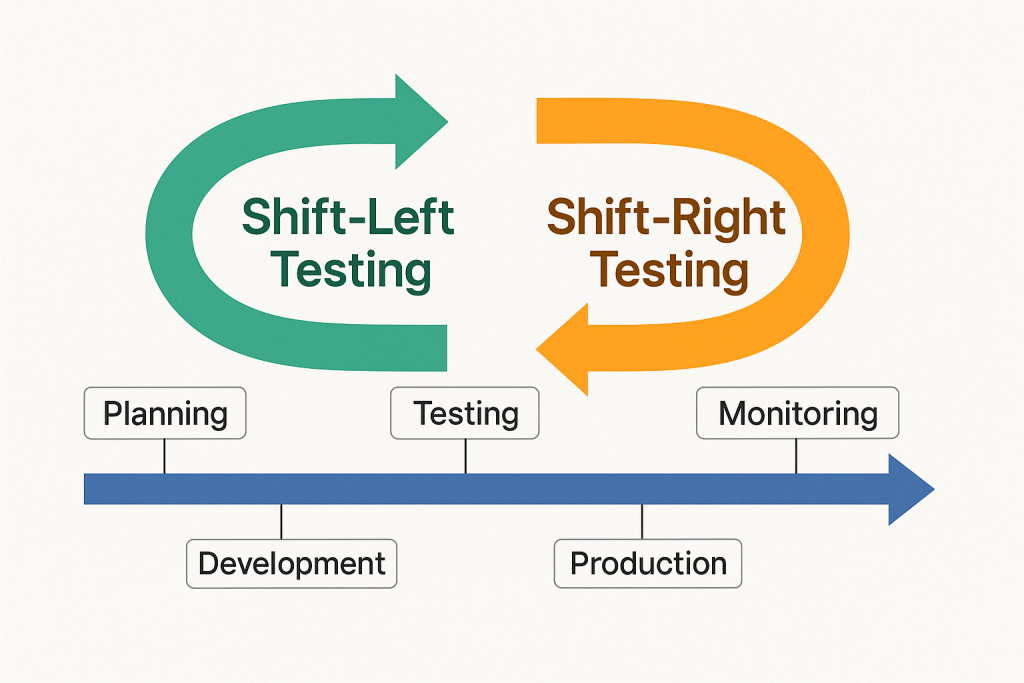
What Is Shift-Left and Shift-Right Testing? Explained Simply

In the world of software development, two popular testing strategies are gaining attention: Shift-Left Testing and Shift-Right Testing. These terms may sound a little technical, but don’t worry! In this blog, we’ll break them down in a very simple way.


🔄 What Do “Shift-Left” and “Shift-Right” Mean?

Imagine software development as a timeline — it starts with planning and ends with releasing the product to users.

  • Left side = Early stages like planning, designing, and coding
  • Right side = Later stages like deployment, user feedback, and maintenance

So when we say:

  • Shift-Left Testing ➜ Move testing earlier in the process
  • Shift-Right Testing ➜ Continue testing after release into production

🧭 Shift-Left Testing: Catching Bugs Early

What is it?
Shift-Left means testing begins before the software is fully built. It’s like checking your ingredients while cooking instead of waiting until the dish is finished.

Why is it useful?

  • Bugs are cheaper and easier to fix early
  • Developers get faster feedback
  • Improves product quality from the beginning

Common Practices:

  • Unit testing
  • Static code analysis
  • Test-driven development (TDD)
  • Continuous integration testing

Example:
A developer writes test cases while writing the code itself. If anything breaks, it’s caught immediately.


🧭 Shift-Right Testing: Keeping an Eye After Launch

What is it?
Shift-Right means testing continues after the software is released. Think of it as checking how your car performs on the road, not just in the garage.

Why is it useful?

  • Real users often behave differently than testers
  • Helps monitor performance in real-world conditions
  • Allows testing for scalability, reliability, and security

Common Practices:

  • A/B testing
  • Real user monitoring (RUM)
  • Synthetic testing
  • Chaos engineering

Example:
A website team monitors how users interact with a new feature after it’s live. If something slows down, they catch and fix it quickly.


🔍 Shift-Left vs Shift-Right: What’s the Difference?

FeatureShift-Left TestingShift-Right Testing
Focus TimeEarly (during development)Late (after release)
Main GoalPrevent bugs earlyDetect issues in production
Tools UsedUnit tests, CI pipelinesMonitoring, A/B testing
Feedback FromDevelopers, QA teamsEnd users, system logs

✅ Which One Should You Use?

Both!
The best teams use Shift-Left to build quality and Shift-Right to ensure reliability in the real world.

Just like a good chef tastes while cooking (left) and gets feedback after serving (right), a smart software team tests both before and after release.


🧠 Final Thoughts

Shift-Left and Shift-Right testing aren’t buzzwords — they’re smart strategies to create better, faster, and safer software. By adopting both, you catch problems early and keep learning from real-world use.

Quality isn’t just a step — it’s a journey from start to finish.

Understanding the Difference Between SDET and QA Analyst: The Essential Roles in Software Testing

In the fast-paced world of software development, ensuring the quality of a product is paramount. Software testing plays a crucial role in identifying defects, improving usability, and verifying the functionality of an application. However, within the field of software testing, two roles often cause confusion: Software Development Engineer in Test (SDET) and Quality Assurance (QA) Analyst. While both aim to deliver high-quality software, their approaches, skill sets, and responsibilities differ significantly. This article aims to clarify these differences and shed light on the impact each role has in modern software development.

What is a QA Analyst?

A Quality Assurance Analyst (QA Analyst) focuses on ensuring that the product meets user expectations, functional requirements, and overall usability. They are primarily concerned with manual testing and exploratory testing, evaluating the product from the end user’s perspective.

Key Responsibilities of a QA Analyst:

– Manual Testing: QA Analysts execute test cases manually to identify defects and ensure that the software meets its functional requirements. Manual testing is essential when testing user interfaces, workflows, and usability aspects that are challenging to automate. – Test Case Design: They write and design detailed test cases based on requirements, ensuring comprehensive coverage of the application’s functionality. – Exploratory Testing: QA Analysts engage in unscripted, exploratory testing to uncover potential edge cases and usability issues that automated tests may not identify. – Collaboration with Teams: They work closely with product owners, developers, and designers to validate workflows and ensure the application is user-friendly. – Bug Reporting and Tracking: Defects found during testing are logged, tracked, and managed using tools like JIRA, ensuring they are addressed before release.

Tools and Skills Used by QA Analysts:

– JIRA for bug tracking and project management. – TestRail for test case management and reporting. – Postman for API testing. – Knowledge of manual testing methodologies and test execution.

When is a QA Analyst Most Valuable?

– Small to medium-sized applications. – Early-stage projects where the product’s user interface and usability need detailed testing. – Projects that require human intuition for exploring new features and identifying potential user experience issues.

What is an SDET?

A Software Development Engineer in Test (SDET) is a specialized role that bridges the gap between development and testing. SDETs focus on test automation, creating frameworks and tools that ensure continuous testing across various stages of the Software Development Life Cycle (SDLC). They possess strong software development skills and are heavily involved in CI/CD pipelines, ensuring that quality is maintained at every stage of the development process.

Key Responsibilities of an SDET:

– Test Automation: SDETs write automated test scripts for unit tests, integration tests, UI tests, and performance tests. Automation significantly speeds up testing cycles and ensures comprehensive test coverage. – CI/CD Integration: SDETs are involved in setting up and maintaining Continuous Integration (CI) and Continuous Delivery (CD) pipelines. They ensure that automated tests are executed whenever code is integrated, allowing for fast feedback. – Building Test Frameworks: SDETs develop reusable test frameworks that can be applied across different projects, making it easier to scale testing as the application grows. – Performance and Load Testing: They also conduct performance tests, stress tests, and load tests to ensure the application can handle high traffic and remains stable under peak loads. – Shift-Left Testing: SDETs work alongside developers to shift testing earlier in the SDLC, allowing defects to be identified and fixed earlier in the development process, which reduces costs and speeds up time-to-market.

Tools and Skills Used by SDETs:

– Automation Tools: Selenium, Cypress, Playwright, Appium for automating UI and API tests. – CI/CD Tools: Jenkins, GitLab CI, CircleCI, Travis CI for integrating tests into the development pipeline. – Languages: Proficiency in programming languages like JavaScript, Python, Java, and C#. – Containerization: Tools like Docker and Kubernetes for creating test environments and ensuring tests run in consistent conditions.

When is an SDET Most Valuable?

– Large, complex applications where manual testing becomes inefficient. – High-velocity teams in Agile or DevOps environments, where quick releases and continuous testing are necessary. – Applications that require extensive automated regression, load, and performance testing.

Key Differences Between QA Analysts and SDETs


Which Role is More Impactful in Today’s Development Environments?

The importance of each role largely depends on the nature of the project and the testing strategy adopted by the organization. – SDETs are crucial in large-scale, fast-paced environments, especially with frequent code changes and deployments. They enable continuous testing and feedback, which is essential in Agile and DevOps settings. Automation not only saves time but also increases test coverage, ensuring that defects are caught early in the development process. – QA Analysts remain invaluable for manual testing, especially in validating user experience, UI consistency, and edge-case scenarios that may be difficult to automate. Conclusion: Both SDET and QA Analyst roles are essential for delivering high-quality software. While the SDET role is focused on automation and scalability, the QA Analyst role ensures that the product is user-friendly and meets functional specifications. The key to success lies in the collaboration between these two roles, ensuring that software is thoroughly tested, performs well, and delivers a seamless experience to users.

How Automating Web Browsers with Selenium and C# in VS Code using Cursor with Command

Web automation is now a cornerstone in software testing and task scripting, allowing developers and testers to simulate user behavior, perform regression testing, and automate repetitive actions. One of the most powerful tools for browser automation is Selenium, and with the rise of cross-platform development, many are now using C# in Visual Studio Code (VS Code) to build these solutions.

In this blog, we’ll walk through how to set up and use Selenium with C# in VS Code, and execute browser commands programmatically using Cursor to mimic user interactions.

Why Selenium with C#?

Selenium supports multiple programming languages, but C# offers robust object-oriented support, great performance, and a rich ecosystem with .NET. It’s a preferred choice in enterprises and QA teams familiar with Microsoft technologies.

Benefits of using C# with Selenium:

  • Strong typing and compile-time checks
  • Easy integration with NUnit/XUnit for testing
  • Full .NET Core compatibility for cross-platform automation
  • Rich LINQ support for manipulating test data

Prerequisites

Before jumping into code, ensure you have the following installed:

Step-by-Step Setup

1. Create a New Console App

dotnet new console -n SeleniumAutomation
cd SeleniumAutomation

2. Add Selenium WebDriver NuGet Packages

Use the following commands to install necessary libraries:

dotnet add package Selenium.WebDriver
dotnet add package Selenium.WebDriver.ChromeDriver
dotnet add package Selenium.Support

3. Code: Launching and Controlling Browser

Open the Program.cs file and write the following code:

using OpenQA.Selenium;
using OpenQA.Selenium.Chrome;
using System;
using System.Threading;

class Program
{
    static void Main(string[] args)
    {
        ChromeOptions options = new ChromeOptions();
        options.AddArgument("--start-maximized");  // Open browser in maximized mode
        using IWebDriver driver = new ChromeDriver(options);

        driver.Navigate().GoToUrl("https://www.google.com");
        Thread.Sleep(2000); // Wait for 2 seconds

        IWebElement searchBox = driver.FindElement(By.Name("q"));
        searchBox.SendKeys("Selenium WebDriver with C#");
        searchBox.SendKeys(Keys.Enter);

        Thread.Sleep(4000); // View results

        driver.Quit(); // Close browser
    }
}

Using Cursor Commands to Simulate Human-Like Actions

For more realistic user interaction, we can control the cursor or mouse pointer using external libraries like InputSimulator or native Windows API wrappers. Here’s an example using the System.Windows.Forms.Cursor for simple movement (only works on Windows):

Add Reference

dotnet add package System.Windows.Forms

Simulate Cursor Movement

using System.Windows.Forms;
using System.Drawing;

class CursorDemo
{
    public static void MoveCursor()
    {
        // Move the cursor to a specific location (x:100, y:200)
        Cursor.Position = new Point(100, 200);
        Console.WriteLine("Cursor moved to (100, 200)");
    }
}

Automating Clicks Using JavaScript with Selenium

You can also execute mouse-like interactions via JavaScript when real cursor movement isn’t necessary:

IJavaScriptExecutor js = (IJavaScriptExecutor)driver;
js.ExecuteScript("document.querySelector('input[name=q]').click();");

Running and Debugging in VS Code

To run the project in VS Code:

  1. Open your project folder in VS Code.
  2. Press Ctrl + Shift + P, select .NET: Generate Assets for Build and Debug.
  3. Press F5 to build and run the application.
  4. The browser should launch and perform the automated actions.

Tips for Effective Browser Automation

  • Always wait for elements to be visible using WebDriverWait or ExpectedConditions.
  • Handle exceptions to prevent hanging browsers.
  • Use headless mode for CI/CD environments:
options.AddArgument("--headless");
  • Log your test steps using Console.WriteLine() or integrate with logging frameworks.

Conclusion

Automating browsers with Selenium and C# in VS Code is a powerful way to streamline testing and repetitive tasks. With cursor control, you can simulate real user actions and make your automation scripts more interactive. Whether you’re automating form submissions, scraping data, or testing web apps, this setup gives you all the flexibility you need in a lightweight and efficient environment.