Why Avoiding Friday Deployments Reveals a Testing Gap

It’s Friday afternoon. Your sprint is wrapping up, everyone’s preparing for the weekend, and the release pipeline is ready. But then someone says the familiar phrase:

“Let’s not deploy today—it’s Friday.”

Sound familiar?

For years, I’ve heard teams say this with pride, as if avoiding Friday deployments was a smart cultural decision. But as a QA Lead who’s been through countless release cycles, I’ve learned this mindset doesn’t reflect maturity—it exposes a testing gap.

In software quality assurance, confidence is built on preparation. If your team fears a Friday release, it usually means the process can’t be trusted to deliver safely any day of the week.


The Real Problem: Fear Comes from Fragility

Let’s be clear: production issues don’t wait for Monday. Emergencies don’t respect your sprint calendar. If you can’t deploy safely on Friday, how can you respond confidently to a live incident on Sunday?

That fear often comes from weak or incomplete testing practices. The product might work “most of the time,” but the team isn’t certain what will break if a deployment goes wrong.

When a deployment depends on luck instead of validation, you’ve built a fragile delivery pipeline. And fragile pipelines lead to fragile teams.


1. The Automation Coverage Gap

One of the most common reasons teams delay Friday deployments is a lack of automated testing. When regression testing is still mostly manual, the process takes time and energy—something you don’t have on a Friday afternoon.

In my team, we faced this exact issue years ago. Regression testing after every integration took nearly 8 hours. We couldn’t risk a Friday deployment because even a minor issue would have to wait till Monday.

So, we automated.

With Selenium and a few carefully designed reusable frameworks, we reduced that regression cycle from 8 hours to 15–20 minutes. The result?
We no longer cared whether it was Monday morning or Friday evening—deployments became routine, not risky.

Automation isn’t just about saving time. It’s about building trust in your process. When your test suite gives you fast, reliable feedback, you stop fearing deployments altogether.


2. The Observability Gap

Even with solid automation, things can still go wrong in production. What separates confident teams from cautious ones is observability.

If you don’t have proper monitoring, logging, and alerting in place, you’re flying blind. A Friday deployment feels risky because no one wants to spend the weekend chasing mysterious errors without enough visibility.

When our team adopted tools like Grafana, ELK Stack, and Application Insights, it changed everything. Suddenly, we could see performance metrics, database response times, and user behavior in real time. That transparency built confidence—deployments stopped being scary.

Remember: observability is your safety net. It’s not about preventing every bug but knowing immediately when something goes wrong.


3. The Infrastructure Gap

The third pillar of confidence is infrastructure as code (IaC). When environments are manually managed, deployments become unpredictable. What works in staging might fail in production due to hidden configuration differences.

IaC tools like Terraform or Ansible make deployments repeatable and version-controlled. Once your infrastructure is codified, you can rebuild environments confidently—even on a Friday—knowing everything is consistent.

In short, manual servers cause manual headaches. Automate your infrastructure, and your weekends will thank you.


4. The Cultural Confidence Gap

Let’s talk culture. Saying “we don’t deploy on Fridays” might sound like a safety-first decision, but it actually signals a lack of trust in the process.

High-performing teams don’t rely on luck or timing—they rely on discipline. They practice continuous integration, continuous testing, and continuous delivery. They build quality into every commit, not just before release day.

When QA, DevOps, and development work as one unit, deployments become just another event in the lifecycle—not a moment of panic.

I once worked with a developer who said, “If we’re afraid to deploy on Friday, maybe we’re afraid of our own work.”
That sentence stuck with me. Fear disappears when confidence grows—and confidence grows with strong testing practices.


5. Fix the Root Cause, Not the Schedule

Avoiding Friday deployments is like avoiding rain by staying indoors—you’re treating the symptom, not the cause.

If your process can’t handle a Friday release, it probably can’t handle a Saturday emergency either. The fix isn’t to block deployments—it’s to strengthen your pipeline so you can deploy safely any day.

Start with these steps:

  • Build robust automated tests that validate every critical workflow.
  • Integrate continuous testing into your CI/CD pipeline.
  • Add real-time observability with meaningful dashboards and alerts.
  • Manage environments through infrastructure as code.
  • Encourage a culture of confidence, not fear.

When all of this is in place, deployment day doesn’t matter. Because every day is a safe day to deploy.


Final Thoughts: Friday Shouldn’t Be the Scariest Day

As QA professionals, our role isn’t just to find bugs—it’s to build trust in delivery. The “no Friday deployment” rule often hides deeper issues with testing maturity, automation gaps, or fragile release processes.

Fixing these gaps transforms your team’s confidence. Suddenly, Friday becomes just another day—a day where your automated tests run, your logs are clear, and your monitoring dashboards stay green.

So, the next time someone says “Let’s not deploy today—it’s Friday,” remind them:

It’s not about the day. It’s about the discipline behind your testing.

If you can deploy confidently on a Friday, you can deploy confidently any day.
And that’s what true quality assurance is all about.

Why Shift Left Testing is a Game-Changer for QA

Software development is evolving faster than ever. Traditional quality assurance (QA) often takes place at the end of the software development lifecycle, where testers validate functionality before release. While this approach worked in the past, today’s fast-paced Agile and DevOps environments demand something more efficient. This is where Shift Left Testing becomes a game-changer.

In simple terms, Shift Left Testing means testing earlier in the development cycle—moving QA activities from the final stages of development to the very beginning. Instead of waiting for developers to finish coding, QA engineers get involved from the planning and design phases. This proactive approach not only ensures higher software quality but also reduces costs and speeds up delivery.


What Does Shift Left Testing Mean?

The term “Shift Left” refers to moving testing activities to the left side of the project timeline. In a traditional waterfall model, requirements and design happen first, development follows, and testing comes at the end. Unfortunately, late testing often leads to discovering critical bugs right before release, causing delays, rework, and cost overruns.

By shifting left, testing activities—like requirement analysis, test planning, unit testing, static code analysis, and automation—are introduced early. This approach helps teams identify and fix issues before they grow into expensive problems.


Why Shift Left Testing is a Game-Changer

1. Early Defect Detection Saves Cost and Time

Industry studies show that the cost of fixing a bug increases exponentially the later it’s found in the lifecycle. A bug discovered during requirement analysis might cost almost nothing to fix, but the same bug found in production can cost thousands of dollars and damage customer trust. Shift Left Testing ensures that issues are caught when they are cheapest and easiest to fix.


2. Improved Collaboration Between QA and Developers

Traditionally, QA and developers worked in silos—developers wrote code, and QA found bugs. Shift Left breaks down these silos. QA engineers participate in requirement discussions, design reviews, and sprint planning. This collaboration builds shared responsibility for quality and fosters a culture where developers write more testable and reliable code.


3. Faster Delivery in Agile and DevOps Environments

With Agile and DevOps, release cycles are shorter, and continuous delivery is the goal. Shift Left Testing supports this model by enabling continuous testing throughout development. Automated tests are run alongside builds, ensuring that every code change is validated quickly. This reduces bottlenecks and accelerates time-to-market.


4. Stronger Focus on Test Automation

Shift Left goes hand-in-hand with test automation. Instead of relying only on manual tests at the end, automated unit tests, API tests, and integration tests are created early. This ensures quicker feedback for developers and strengthens regression testing for future sprints. QA engineers evolve into automation specialists, boosting productivity.


5. Better Requirement Clarity and Coverage

When testers join requirement analysis sessions, they help uncover ambiguities, missing details, or unrealistic expectations early. Testers often think from an end-user perspective, which helps refine requirements. This leads to fewer misunderstandings, more complete test coverage, and ultimately a product that meets user needs better.


6. Reduced Risk of Production Failures

Shift Left Testing significantly reduces the chance of last-minute surprises. With continuous validation and early defect detection, the product is more stable by the time it reaches production. This means fewer hotfixes, fewer emergency patches, and happier customers.


7. Enhanced QA Role and Career Growth

For QA engineers, Shift Left is not just a methodology—it’s a career booster. Testers are no longer limited to “finding bugs at the end.” Instead, they play a vital role in shaping product quality from the very beginning. This shift elevates QA from being a reactive function to a proactive partner in the software development lifecycle.


Real-Life Example: How Shift Left Changed My QA Projects

In my own QA journey, implementing Shift Left has been transformative. For one project, regression testing used to take almost 8 hours after integration. By adopting automation early and involving QA in sprint planning, we reduced that effort to just 15–20 minutes. This change not only improved efficiency but also built trust between QA and developers. Bugs that previously slipped into production were now caught much earlier, improving customer satisfaction and saving costs.


Best Practices for Adopting Shift Left Testing

  • Involve QA early: Bring testers into requirement and design discussions.
  • Invest in automation: Build unit, API, and integration tests from the start.
  • Adopt CI/CD pipelines: Integrate automated tests into your build and deployment pipelines.
  • Encourage cross-team collaboration: Foster open communication between developers, testers, and product owners.
  • Focus on quality culture: Make quality everyone’s responsibility, not just QA’s.

Conclusion

Shift Left Testing is more than just a buzzword—it’s a cultural and technical shift that transforms how software quality is ensured. By detecting defects early, improving collaboration, and enabling faster delivery, Shift Left Testing has become a game-changer for QA in modern software development.

For organizations aiming to deliver high-quality products faster and at lower costs, adopting Shift Left is no longer optional—it’s essential.

Performance Engineering vs. Performance Testing – Why It’s More Than Just Running Tests

In today’s fast-paced digital world, users expect websites and apps to load instantly and work smoothly. A slow app means frustrated users and lost business.

To make sure software performs well, teams have traditionally used Performance Testing. But now, the focus is shifting toward something broader and smarter: Performance Engineering.

In this blog, we’ll explain the difference between the two and why performance engineering is the future.


🔍 What Is Performance Testing?

Performance Testing is the process of checking how fast and stable an application is under different conditions—like many users logging in at the same time.

It helps answer questions like:

  • How fast does the website load?
  • Can the app handle 10,000 users at once?
  • Does it crash when there’s too much traffic?

Types of performance testing include:

  • Load Testing – Checks how the system handles normal and peak loads.
  • Stress Testing – Pushes the app beyond its limits to see when it breaks.
  • Spike Testing – Tests how the app reacts to sudden traffic jumps.

But here’s the problem: performance testing is usually done at the end of development—when it’s too late to make major changes.


🧠 What Is Performance Engineering?

Performance Engineering is a proactive and continuous approach. It means designing and building software with performance in mind from the beginning.

Instead of just testing performance, engineers:

  • Build apps to run fast from day one
  • Optimize architecture, code, and databases early
  • Monitor real-world performance continuously
  • Work with developers, testers, and DevOps teams

It’s a culture, not a final step.


🆚 Key Differences:

FeaturePerformance TestingPerformance Engineering
When it happensAt the end of developmentThroughout the software lifecycle
GoalDetect performance issuesPrevent and design for performance
Tools usedLoadRunner, JMeterJMeter, APMs (like New Relic, Dynatrace)
Team involvementMostly testersDevelopers, testers, architects, DevOps
FocusSimulate load and check responseAnalyze, design, optimize continuously

🚀 Why Performance Engineering Is Better

  1. Early Detection = Faster Fixes
    Fixing issues in design or code is easier and cheaper than fixing them later.
  2. Better User Experience
    Apps are smoother and faster from day one.
  3. Reduces Risk in Production
    No more last-minute surprises when you go live.
  4. Supports DevOps and Agile
    Fits perfectly into continuous integration and delivery pipelines.

🛠️ Tools Used in Performance Engineering

  • JMeter – Still useful for testing and baselines
  • Gatling – Developer-friendly performance testing tool
  • New Relic / Dynatrace / AppDynamics – Real-time performance monitoring
  • Lighthouse / WebPageTest – Frontend performance analysis
  • Grafana + Prometheus – Metrics and dashboards for monitoring

Best Practices for Performance Engineering

  • Plan performance as early as requirement gathering
  • Include performance KPIs in every sprint
  • Use automation for performance validation
  • Collaborate across teams—QA, Dev, Ops
  • Continuously monitor and optimize in production

🏁 Conclusion

Performance Testing is still important, but it’s no longer enough. Today’s systems are complex, distributed, and always online. That’s why Performance Engineering is the smarter way forward—it builds performance into the software from the start.

If you’re starting your QA or DevOps career, learning performance engineering skills will give you a big advantage.


Continuous Testing in CI/CD Pipelines: Why It Matters and How to Do It Right

In the fast-paced world of modern software development, speed, reliability, and quality are non-negotiable. That’s where Continuous Testing (CT) steps in—an integral part of any CI/CD pipeline that ensures every code change is automatically tested before it reaches production.

In this blog post, we’ll explore what continuous testing is, why it’s critical in CI/CD pipelines, the benefits it offers, and how you can implement it effectively.


🚀 What is Continuous Testing?

Continuous Testing is the practice of executing automated tests at every stage of the software delivery lifecycle. This ensures that defects are identified and resolved as early as possible—ideally, right after a developer commits code.

It goes beyond just unit tests. It includes:

  • Unit Testing
  • Integration Testing
  • API Testing
  • End-to-End (E2E) Testing
  • Performance & Load Testing
  • Security Testing

🛠️ Role of Continuous Testing in CI/CD Pipelines

CI/CD pipelines enable continuous integration (merging code changes frequently) and continuous delivery/deployment (releasing software rapidly and reliably).

Without continuous testing:

  • Bugs can slip into production
  • Releases become risky
  • Rollbacks become frequent and painful

With continuous testing:

  • Tests run automatically at every pipeline stage
  • Builds are verified in real-time
  • Feedback loops shorten dramatically
  • Teams gain confidence in faster releases

💡 Benefits of Continuous Testing

  1. Early Bug Detection
    • Fixing bugs earlier reduces cost and rework.
  2. Faster Feedback
    • Developers get instant insights into code quality after each commit.
  3. Improved Release Velocity
    • With automated gates in place, teams can release more frequently.
  4. Higher Test Coverage
    • Automation allows broad testing across browsers, devices, APIs, and integrations.
  5. Risk Reduction
    • Security, compliance, and performance issues are detected pre-production.

🔧 How to Implement Continuous Testing Effectively

Here’s a practical guide:

1. Automate Everything

  • Use frameworks like JUnit, TestNG, PyTest, Selenium, Postman/Newman, or Cypress.
  • Ensure tests are fast and reliable.

2. Shift Left

  • Integrate testing as early as the development stage.
  • Run unit and integration tests as part of the pre-commit hooks.

3. Use CI/CD Tools

  • Popular options: GitHub Actions, GitLab CI, Jenkins, Azure DevOps, CircleCI, Travis CI.
  • Configure pipelines to trigger tests on every push or pull request.

4. Incorporate Test Stages

  • Build Stage: Unit & lint checks
  • Pre-deploy Stage: Integration, security scans
  • Post-deploy Stage: Smoke tests, performance monitoring

5. Containerization Helps

  • Use Docker for consistent test environments.
  • Easier to scale and replicate across teams.

6. Monitor and Report

  • Use tools like Allure Reports, JUnit reports, or custom dashboards.
  • Make test results visible and accessible.

🧠 Best Practices

  • Keep tests deterministic—no random failures.
  • Run tests in parallel to speed up pipelines.
  • Use mock data and services to isolate tests.
  • Regularly review and prune flaky tests.
  • Adopt Test-Driven Development (TDD) where applicable.

📊 Real-World Example: GitHub Actions + Cypress

# .github/workflows/ci.yml
name: CI

on: [push, pull_request]

jobs:
  test:
    runs-on: ubuntu-latest
    steps:
      - uses: actions/checkout@v3
      - name: Install Dependencies
        run: npm install
      - name: Run Tests
        run: npm run test
      - name: Run E2E Tests
        run: npm run cypress:run

This simple pipeline installs dependencies, runs unit tests, and launches Cypress for E2E testing—all automatically on each commit.


🔚 Conclusion

Continuous Testing isn’t just a best practice—it’s a necessity in modern DevOps and agile teams. By embedding testing into your CI/CD pipelines, you build robust, secure, and reliable software faster.

Whether you’re a solo developer or part of a large team, investing in a smart testing strategy pays off in quality and customer satisfaction.

TestOps: When Testing Meets DevOps

In the world of modern software development, two things matter the most — speed and quality. Everyone wants to release software faster, but nobody wants bugs or failures. So how do we make sure software is delivered quickly and works perfectly? That’s where TestOps comes into play.

🚀 What is TestOps?

TestOps is a blend of two key ideas: Testing and DevOps. It means integrating software testing directly into the DevOps process — making sure testing happens continuously, automatically, and collaboratively throughout the software development lifecycle.

In simple terms, TestOps is the practice of including testers and testing activities in the DevOps workflow, right from planning to production. This approach helps teams detect problems earlier, fix them faster, and release better products to users.


🧠 Why Do We Need TestOps?

In traditional development, testing is often seen as a final step — something done after coding is complete. But this approach causes many problems:

  • Bugs are found too late.
  • Fixing issues becomes expensive and time-consuming.
  • Release delays occur due to last-minute testing surprises.

With TestOps, testing is no longer an afterthought. It becomes a continuous and automated process that works alongside development and operations. This saves time, reduces errors, and improves product quality from day one.


⚙️ How TestOps Works in Practice

Let’s break down how TestOps actually works in a real development process:

1. Shift-Left Testing

Testing starts early, even before the coding begins. Testers join the planning phase, write test cases for user stories, and help define what quality means for each feature.

2. Continuous Integration & Continuous Testing

Every time a developer pushes code, it goes through automated tests. This is part of a CI/CD pipeline. If any test fails, the developer is notified immediately. This avoids surprises later.

3. Test Automation at the Core

Manual testing is limited to exploratory or user-experience scenarios. Most functional, regression, and performance tests are automated using tools like:

  • Selenium
  • Playwright
  • Cypress
  • JUnit/TestNG
  • Postman (for API testing)

4. Collaboration Between Teams

Developers, testers, and DevOps engineers work as one team. They use shared tools, dashboards, and pipelines. Everyone understands the testing status and quality metrics in real-time.

5. Shift-Right Testing (Testing in Production)

TestOps also includes testing after release using tools that monitor performance, error logs, and real user behavior. This helps catch issues that were not found in pre-release testing.

🧰 Tools That Make TestOps Possible

Here are some tools commonly used in a TestOps environment:

AreaTools (Examples)
CI/CD PipelinesJenkins, GitLab CI/CD, GitHub Actions
Automation TestingSelenium, Cypress, Playwright, TestNG
API TestingPostman, RestAssured, SoapUI
Test ReportingAllure, ExtentReports, ReportPortal
Monitoring & LoggingGrafana, Prometheus, ELK Stack, Datadog
ContainerizationDocker, Kubernetes

These tools work together to help teams automate testing and make it a natural part of the development workflow.


✅ Benefits of TestOps

TestOps offers many advantages to modern teams:

🔹 Faster Releases

Automated testing speeds up the development and deployment process.

🔹 Higher Product Quality

Bugs are caught early, so the final product is more stable and reliable.

🔹 Real-Time Feedback

Developers and testers get immediate feedback on their work.

🔹 Better Collaboration

Testers become active participants in DevOps. This breaks down silos between QA and development teams.

🔹 Lower Costs

Fixing bugs early is cheaper than fixing them after release.


🧑‍🤝‍🧑 Who Should Use TestOps?

TestOps is ideal for:

  • Agile Teams who release frequently
  • QA Engineers who want to shift into DevOps roles
  • DevOps Engineers who want better quality control
  • Developers who care about testing and feedback
  • Product Owners who want fewer delays and happier users

🔄 Example Workflow: A Day in the Life of TestOps

Let’s imagine a team using TestOps:

  1. A developer writes new code for a login feature.
  2. They push the code to a shared repository (like GitHub).
  3. Automatically, the CI pipeline runs:
    • Unit tests
    • Integration tests
    • UI tests
  4. A bug is found in the UI test.
  5. The developer is alerted and fixes it quickly.
  6. Once tests pass, the code is deployed to staging.
  7. Testers perform exploratory testing in staging.
  8. Once approved, the feature goes live.
  9. Monitoring tools keep track of user logins and performance in production.

This whole process is smooth, fast, and collaborative — thanks to TestOps.


🌟 Final Thoughts

TestOps is not just a buzzword. It’s a smarter way to build software.

By combining testing with DevOps, teams can move faster without sacrificing quality. Testers are no longer stuck at the end of the process. They are now part of every step — planning, coding, releasing, and even monitoring.

If your team wants to improve efficiency, reduce bugs, and deliver better experiences to users, it’s time to adopt TestOps.


What Is Shift-Left and Shift-Right Testing? Explained Simply

In the world of software development, two popular testing strategies are gaining attention: Shift-Left Testing and Shift-Right Testing. These terms may sound a little technical, but don’t worry! In this blog, we’ll break them down in a very simple way.


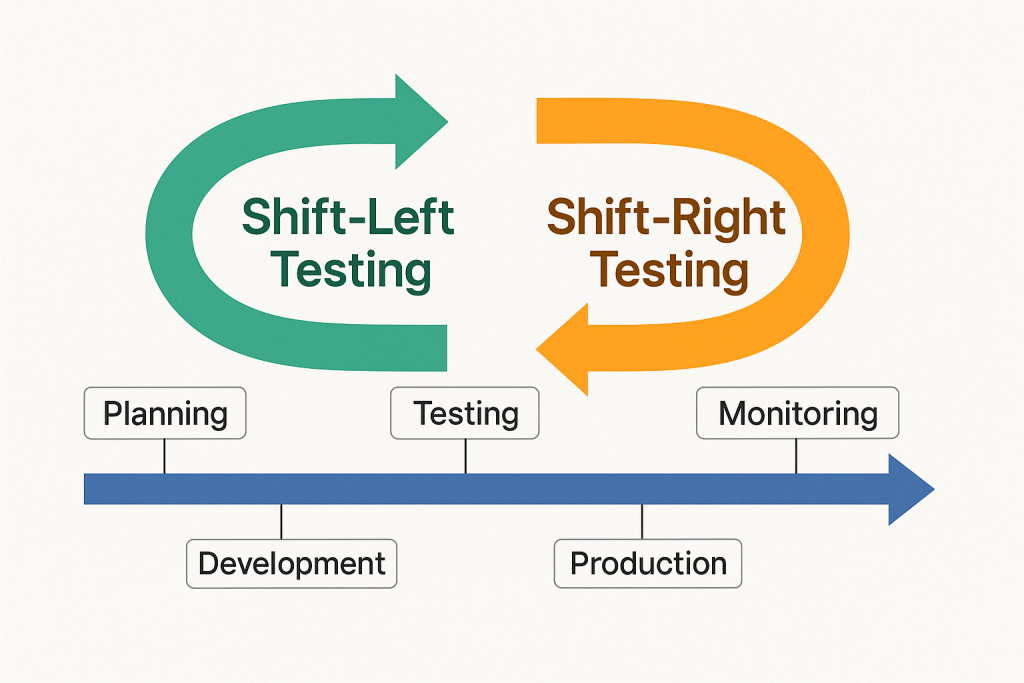
🔄 What Do “Shift-Left” and “Shift-Right” Mean?

Imagine software development as a timeline — it starts with planning and ends with releasing the product to users.

  • Left side = Early stages like planning, designing, and coding
  • Right side = Later stages like deployment, user feedback, and maintenance

So when we say:

  • Shift-Left Testing ➜ Move testing earlier in the process
  • Shift-Right Testing ➜ Continue testing after release into production

🧭 Shift-Left Testing: Catching Bugs Early

What is it?
Shift-Left means testing begins before the software is fully built. It’s like checking your ingredients while cooking instead of waiting until the dish is finished.

Why is it useful?

  • Bugs are cheaper and easier to fix early
  • Developers get faster feedback
  • Improves product quality from the beginning

Common Practices:

  • Unit testing
  • Static code analysis
  • Test-driven development (TDD)
  • Continuous integration testing

Example:
A developer writes test cases while writing the code itself. If anything breaks, it’s caught immediately.


🧭 Shift-Right Testing: Keeping an Eye After Launch

What is it?
Shift-Right means testing continues after the software is released. Think of it as checking how your car performs on the road, not just in the garage.

Why is it useful?

  • Real users often behave differently than testers
  • Helps monitor performance in real-world conditions
  • Allows testing for scalability, reliability, and security

Common Practices:

  • A/B testing
  • Real user monitoring (RUM)
  • Synthetic testing
  • Chaos engineering

Example:
A website team monitors how users interact with a new feature after it’s live. If something slows down, they catch and fix it quickly.


🔍 Shift-Left vs Shift-Right: What’s the Difference?

FeatureShift-Left TestingShift-Right Testing
Focus TimeEarly (during development)Late (after release)
Main GoalPrevent bugs earlyDetect issues in production
Tools UsedUnit tests, CI pipelinesMonitoring, A/B testing
Feedback FromDevelopers, QA teamsEnd users, system logs

✅ Which One Should You Use?

Both!
The best teams use Shift-Left to build quality and Shift-Right to ensure reliability in the real world.

Just like a good chef tastes while cooking (left) and gets feedback after serving (right), a smart software team tests both before and after release.


🧠 Final Thoughts

Shift-Left and Shift-Right testing aren’t buzzwords — they’re smart strategies to create better, faster, and safer software. By adopting both, you catch problems early and keep learning from real-world use.

Quality isn’t just a step — it’s a journey from start to finish.

Top 10 AI-Powered Testing Tools in 2025

Artificial Intelligence (AI) continues to redefine how we approach software testing. In 2025, AI-driven tools don’t just automate tests—they intelligently generate, maintain, and optimize them. These tools help QA teams deliver faster, reduce errors, and gain deeper insights. Here’s a list of the top 10 AI-powered testing tools in 2025, each handpicked for its innovation and real-world impact.


1. Testim by Tricentis

Best for: UI and functional testing with self-healing capabilities
Testim leverages machine learning to accelerate authoring, execution, and maintenance of automated tests. In 2025, it features improved self-healing tests, seamless CI/CD integrations, and better analytics for root cause analysis—making it a favorite for fast-paced Agile teams.
Link: https://www.testim.io


2. Katalon Studio

Best for: End-to-end testing for web, mobile, API, and desktop
Katalon’s AI engine identifies flaky tests, suggests optimal test suites, and automates test creation. The 2025 edition includes visual testing, advanced smart wait, and AI-generated scripts—enhancing test reliability and efficiency.
Link: https://katalon.com


3. Applitools

Best for: Visual AI testing
Applitools uses Visual AI to detect UI bugs that traditional tools often miss. It now supports smart diffing, layout-based comparison, and AI-driven test maintenance, ensuring your interfaces stay pixel-perfect across browsers and screen sizes.
Link: https://applitools.com


4. Mabl

Best for: Intelligent web automation with cloud-native support
Mabl blends low-code test creation with AI-powered insights and test healing. It automatically adapts to UI changes, provides deep performance analysis, and generates test coverage metrics through intelligent data collection.
Link: https://www.mabl.com


5. Functionize

Best for: Scalable enterprise test automation
Functionize combines machine learning and natural language processing to allow test creation from plain English. Its AI ensures test cases adapt automatically to application changes, making it ideal for large, complex applications.
Link: https://www.functionize.com


6. Test.AI

Best for: AI bots for user behavior simulation
Test.AI uses AI agents to mimic human user actions and detect issues at scale. Its intelligent crawlers explore apps, detect UI bugs, and improve test coverage by learning behavior patterns, without needing traditional test scripts.
Link: https://test.ai


7. ACCELQ

Best for: Continuous testing with AI-driven planning
ACCELQ uses predictive analytics and natural language test modeling to streamline test planning and automation. Its no-code platform is ideal for business users and QA engineers alike, enabling quick adaptation to change.
Link: https://www.accelq.com


8. Perfecto

Best for: Cloud-based mobile and web app testing
Perfecto integrates AI for faster debugging, flaky test detection, and smart analytics. Its cloud platform supports real-device testing and parallel executions for optimized test cycles.
Link: https://www.perfecto.io


9. TestCraft

Best for: Codeless Selenium-based test automation
TestCraft combines visual test creation with AI that updates test paths automatically. It’s especially useful for teams using Selenium who want to reduce maintenance and gain test resilience across UI changes.
Link: https://www.testcraft.io


10. Virtuoso

Best for: AI-enhanced end-to-end testing
Virtuoso enables testers to create scripts using plain English, with AI handling DOM scanning, dynamic data handling, and test self-healing. It reduces testing complexity while increasing efficiency for fast-moving teams.
Link: https://www.virtuoso.qa

11. TestRigor (Bonus)

Best for: Plain English end-to-end testing for web, mobile, and APIs
TestRigor enables writing test cases in natural language without needing to deal with code, locators, or XPaths. Its AI engine automatically adapts to UI changes and identifies elements based on human-readable text, reducing flakiness. The 2025 version supports web, mobile, desktop, and API testing from a single platform, all integrated with CI/CD workflows and parallel execution in the cloud.
Link: https://testrigor.com


✅ Final Thoughts

The rise of AI in testing has brought a new level of efficiency, intelligence, and scalability. Whether you’re looking to reduce test maintenance, speed up releases, or improve test reliability, these tools offer the capabilities to transform your QA strategy in 2025 and beyond.