Top Cloud-Based Testing Platforms: Boost QA with Scalable, Fast & Real-Device Testing

In today’s fast-paced software development world, quality assurance (QA) must keep up with rapid releases, diverse user environments, and tight deadlines. Traditional testing methods are no longer enough. Enter cloud-based testing platforms — a game-changer for scalable, cost-effective, and fast testing across devices and browsers.

What is Cloud-Based Testing?

Cloud-based testing is a software testing approach where tests are run on cloud infrastructure rather than local servers or physical labs. It allows developers and testers to validate applications across multiple operating systems, browsers, and devices—all from the cloud.

Why Choose Cloud-Based Testing Platforms?

1. Scalability on Demand

Quickly scale your testing infrastructure up or down. No need for physical test labs or complex setups.

2. Access to Real Devices

Test on thousands of real smartphones, tablets, and browsers remotely for reliable cross-platform compatibility.

3. Accelerated Test Execution

Run parallel tests to reduce execution time dramatically—essential for Agile and DevOps pipelines.

4. Cost-Efficient

Pay-as-you-go models eliminate upfront hardware costs and reduce maintenance overhead.

5. Global Collaboration

Remote teams can test and debug simultaneously using centralized cloud environments.

Best Cloud-Based Testing Platforms in 2025

PlatformKey Features
BrowserStackReal device cloud, Selenium/Appium support, CI/CD integration
Sauce LabsCross-browser + mobile app testing, visual testing, analytics
LambdaTest3000+ environments, performance + accessibility testing
AWS Device FarmMobile app testing on real Android/iOS devices
Azure DevTest LabsCustom VMs, budget control, test integration with Azure Pipelines

Use Cases of Cloud Testing

  • Cross-browser testing for web apps
  • Mobile app validation on multiple devices
  • Stress testing and load simulation
  • QA automation in CI/CD pipelines

Challenges to Watch For

  • Data privacy: Ensure cloud providers are compliant (e.g., GDPR, HIPAA)
  • Network latency: Optimize test scripts and choose the right server location
  • Vendor lock-in: Use open-source frameworks like Selenium/Appium to avoid over-reliance

Conclusion

Cloud-based testing platforms empower QA teams to move faster, test smarter, and deliver higher-quality software. As more organizations shift to DevOps and agile delivery, these platforms provide the flexibility and performance needed for modern development environments.

Embracing cloud testing is no longer optional—it’s essential for teams aiming to release better products faster.

Quality Assurance Career Path: Your Complete Step-by-Step QA Journey

Introduction: What is a QA Career Path?

If you’re looking for a future-proof tech career, Quality Assurance (QA) is one of the most promising options in 2025. The QA career path not only provides job stability but also a structured growth route from beginner to executive level.

This guide offers a full roadmap of the software QA career path, highlighting job roles, skills, certifications, and growth strategies to help you plan your next move.


🧭 QA Career Path in 2025: Step-by-Step Guide

1. QA Tester (Entry-Level Role)

Keywords: QA Tester skills, QA job for beginners, manual testing
Start here if you’re new to software testing. Learn the fundamentals of:

  • Manual testing
  • Bug tracking tools (e.g., JIRA)
  • Writing test cases

📌 Certifications:

  • ISTQB Foundation Level
  • Communication & soft skills training

2. Senior QA Engineer

Keywords: Senior QA engineer, automation testing, ISTQB advanced
Once you master basic testing:

  • Learn automation tools like Selenium or Postman
  • Begin mentoring junior testers
  • Write and manage test strategies

📌 Certifications:

  • ISTQB Advanced Level
  • Test automation tool certifications

3. QA Analyst / Senior QA

Keywords: QA Analyst, test planning, stakeholder communication
In this role, you:

  • Understand business needs deeply
  • Create advanced test plans
  • Serve as a liaison between QA, development, and business teams

📌 Skills Needed:

  • Soft skills (communication, presentations)
  • Business domain knowledge (e.g., e-commerce, finance)

4. QA Manager

Keywords: QA team lead, QA Manager role, test team leadership
Step into leadership:

  • Manage testing teams
  • Define QA processes
  • Align QA with business strategy

📌 Certifications:

  • ISTQB Test Manager
  • PMP or Scrum Master

5. ISTQB Specialist / QA Expert

Keywords: ISTQB expert, QA certifications, performance testing
This role focuses on niche areas:

  • Performance testing
  • Security testing
  • Compliance and audit

📌 Certifications:

  • ISTQB Expert Level
  • Specialized testing certifications (e.g., JMeter, OWASP)

6. Director of Quality Assurance

Keywords: QA Director, QA strategy, executive QA role
This top-tier role is for those who:

  • Build company-wide QA strategy
  • Manage cross-functional teams
  • Represent quality in executive decisions

📌 Education & Skills:

  • Bachelor’s or Master’s in Computer Science
  • Strategic thinking, budgeting, leadership

🔑 Essential QA Skills in 2025

Keywords: QA soft skills, AI in QA, latest QA trends
QA professionals must also:

  • Improve communication and soft skills
  • Stay updated with AI-driven testing tools
  • Learn about DevOps, CI/CD, and cloud-based testing

🎯 Conclusion: Build Your Future in QA

Whether you’re aiming to become a QA Tester or a Director of Quality Assurance, there is a clear, structured career path waiting for you in the world of QA. Upskill, certify, and grow step by step.

Start your journey now — because great software needs great QA.

Continuous Testing in CI/CD Pipelines: Why It Matters and How to Do It Right

In the fast-paced world of modern software development, speed, reliability, and quality are non-negotiable. That’s where Continuous Testing (CT) steps in—an integral part of any CI/CD pipeline that ensures every code change is automatically tested before it reaches production.

In this blog post, we’ll explore what continuous testing is, why it’s critical in CI/CD pipelines, the benefits it offers, and how you can implement it effectively.


🚀 What is Continuous Testing?

Continuous Testing is the practice of executing automated tests at every stage of the software delivery lifecycle. This ensures that defects are identified and resolved as early as possible—ideally, right after a developer commits code.

It goes beyond just unit tests. It includes:

  • Unit Testing
  • Integration Testing
  • API Testing
  • End-to-End (E2E) Testing
  • Performance & Load Testing
  • Security Testing

🛠️ Role of Continuous Testing in CI/CD Pipelines

CI/CD pipelines enable continuous integration (merging code changes frequently) and continuous delivery/deployment (releasing software rapidly and reliably).

Without continuous testing:

  • Bugs can slip into production
  • Releases become risky
  • Rollbacks become frequent and painful

With continuous testing:

  • Tests run automatically at every pipeline stage
  • Builds are verified in real-time
  • Feedback loops shorten dramatically
  • Teams gain confidence in faster releases

💡 Benefits of Continuous Testing

  1. Early Bug Detection
    • Fixing bugs earlier reduces cost and rework.
  2. Faster Feedback
    • Developers get instant insights into code quality after each commit.
  3. Improved Release Velocity
    • With automated gates in place, teams can release more frequently.
  4. Higher Test Coverage
    • Automation allows broad testing across browsers, devices, APIs, and integrations.
  5. Risk Reduction
    • Security, compliance, and performance issues are detected pre-production.

🔧 How to Implement Continuous Testing Effectively

Here’s a practical guide:

1. Automate Everything

  • Use frameworks like JUnit, TestNG, PyTest, Selenium, Postman/Newman, or Cypress.
  • Ensure tests are fast and reliable.

2. Shift Left

  • Integrate testing as early as the development stage.
  • Run unit and integration tests as part of the pre-commit hooks.

3. Use CI/CD Tools

  • Popular options: GitHub Actions, GitLab CI, Jenkins, Azure DevOps, CircleCI, Travis CI.
  • Configure pipelines to trigger tests on every push or pull request.

4. Incorporate Test Stages

  • Build Stage: Unit & lint checks
  • Pre-deploy Stage: Integration, security scans
  • Post-deploy Stage: Smoke tests, performance monitoring

5. Containerization Helps

  • Use Docker for consistent test environments.
  • Easier to scale and replicate across teams.

6. Monitor and Report

  • Use tools like Allure Reports, JUnit reports, or custom dashboards.
  • Make test results visible and accessible.

🧠 Best Practices

  • Keep tests deterministic—no random failures.
  • Run tests in parallel to speed up pipelines.
  • Use mock data and services to isolate tests.
  • Regularly review and prune flaky tests.
  • Adopt Test-Driven Development (TDD) where applicable.

📊 Real-World Example: GitHub Actions + Cypress

# .github/workflows/ci.yml
name: CI

on: [push, pull_request]

jobs:
  test:
    runs-on: ubuntu-latest
    steps:
      - uses: actions/checkout@v3
      - name: Install Dependencies
        run: npm install
      - name: Run Tests
        run: npm run test
      - name: Run E2E Tests
        run: npm run cypress:run

This simple pipeline installs dependencies, runs unit tests, and launches Cypress for E2E testing—all automatically on each commit.


🔚 Conclusion

Continuous Testing isn’t just a best practice—it’s a necessity in modern DevOps and agile teams. By embedding testing into your CI/CD pipelines, you build robust, secure, and reliable software faster.

Whether you’re a solo developer or part of a large team, investing in a smart testing strategy pays off in quality and customer satisfaction.

TestOps: When Testing Meets DevOps

In the world of modern software development, two things matter the most — speed and quality. Everyone wants to release software faster, but nobody wants bugs or failures. So how do we make sure software is delivered quickly and works perfectly? That’s where TestOps comes into play.

🚀 What is TestOps?

TestOps is a blend of two key ideas: Testing and DevOps. It means integrating software testing directly into the DevOps process — making sure testing happens continuously, automatically, and collaboratively throughout the software development lifecycle.

In simple terms, TestOps is the practice of including testers and testing activities in the DevOps workflow, right from planning to production. This approach helps teams detect problems earlier, fix them faster, and release better products to users.


🧠 Why Do We Need TestOps?

In traditional development, testing is often seen as a final step — something done after coding is complete. But this approach causes many problems:

  • Bugs are found too late.
  • Fixing issues becomes expensive and time-consuming.
  • Release delays occur due to last-minute testing surprises.

With TestOps, testing is no longer an afterthought. It becomes a continuous and automated process that works alongside development and operations. This saves time, reduces errors, and improves product quality from day one.


⚙️ How TestOps Works in Practice

Let’s break down how TestOps actually works in a real development process:

1. Shift-Left Testing

Testing starts early, even before the coding begins. Testers join the planning phase, write test cases for user stories, and help define what quality means for each feature.

2. Continuous Integration & Continuous Testing

Every time a developer pushes code, it goes through automated tests. This is part of a CI/CD pipeline. If any test fails, the developer is notified immediately. This avoids surprises later.

3. Test Automation at the Core

Manual testing is limited to exploratory or user-experience scenarios. Most functional, regression, and performance tests are automated using tools like:

  • Selenium
  • Playwright
  • Cypress
  • JUnit/TestNG
  • Postman (for API testing)

4. Collaboration Between Teams

Developers, testers, and DevOps engineers work as one team. They use shared tools, dashboards, and pipelines. Everyone understands the testing status and quality metrics in real-time.

5. Shift-Right Testing (Testing in Production)

TestOps also includes testing after release using tools that monitor performance, error logs, and real user behavior. This helps catch issues that were not found in pre-release testing.

🧰 Tools That Make TestOps Possible

Here are some tools commonly used in a TestOps environment:

AreaTools (Examples)
CI/CD PipelinesJenkins, GitLab CI/CD, GitHub Actions
Automation TestingSelenium, Cypress, Playwright, TestNG
API TestingPostman, RestAssured, SoapUI
Test ReportingAllure, ExtentReports, ReportPortal
Monitoring & LoggingGrafana, Prometheus, ELK Stack, Datadog
ContainerizationDocker, Kubernetes

These tools work together to help teams automate testing and make it a natural part of the development workflow.


✅ Benefits of TestOps

TestOps offers many advantages to modern teams:

🔹 Faster Releases

Automated testing speeds up the development and deployment process.

🔹 Higher Product Quality

Bugs are caught early, so the final product is more stable and reliable.

🔹 Real-Time Feedback

Developers and testers get immediate feedback on their work.

🔹 Better Collaboration

Testers become active participants in DevOps. This breaks down silos between QA and development teams.

🔹 Lower Costs

Fixing bugs early is cheaper than fixing them after release.


🧑‍🤝‍🧑 Who Should Use TestOps?

TestOps is ideal for:

  • Agile Teams who release frequently
  • QA Engineers who want to shift into DevOps roles
  • DevOps Engineers who want better quality control
  • Developers who care about testing and feedback
  • Product Owners who want fewer delays and happier users

🔄 Example Workflow: A Day in the Life of TestOps

Let’s imagine a team using TestOps:

  1. A developer writes new code for a login feature.
  2. They push the code to a shared repository (like GitHub).
  3. Automatically, the CI pipeline runs:
    • Unit tests
    • Integration tests
    • UI tests
  4. A bug is found in the UI test.
  5. The developer is alerted and fixes it quickly.
  6. Once tests pass, the code is deployed to staging.
  7. Testers perform exploratory testing in staging.
  8. Once approved, the feature goes live.
  9. Monitoring tools keep track of user logins and performance in production.

This whole process is smooth, fast, and collaborative — thanks to TestOps.


🌟 Final Thoughts

TestOps is not just a buzzword. It’s a smarter way to build software.

By combining testing with DevOps, teams can move faster without sacrificing quality. Testers are no longer stuck at the end of the process. They are now part of every step — planning, coding, releasing, and even monitoring.

If your team wants to improve efficiency, reduce bugs, and deliver better experiences to users, it’s time to adopt TestOps.


What Is Shift-Left and Shift-Right Testing? Explained Simply

In the world of software development, two popular testing strategies are gaining attention: Shift-Left Testing and Shift-Right Testing. These terms may sound a little technical, but don’t worry! In this blog, we’ll break them down in a very simple way.


🔄 What Do “Shift-Left” and “Shift-Right” Mean?

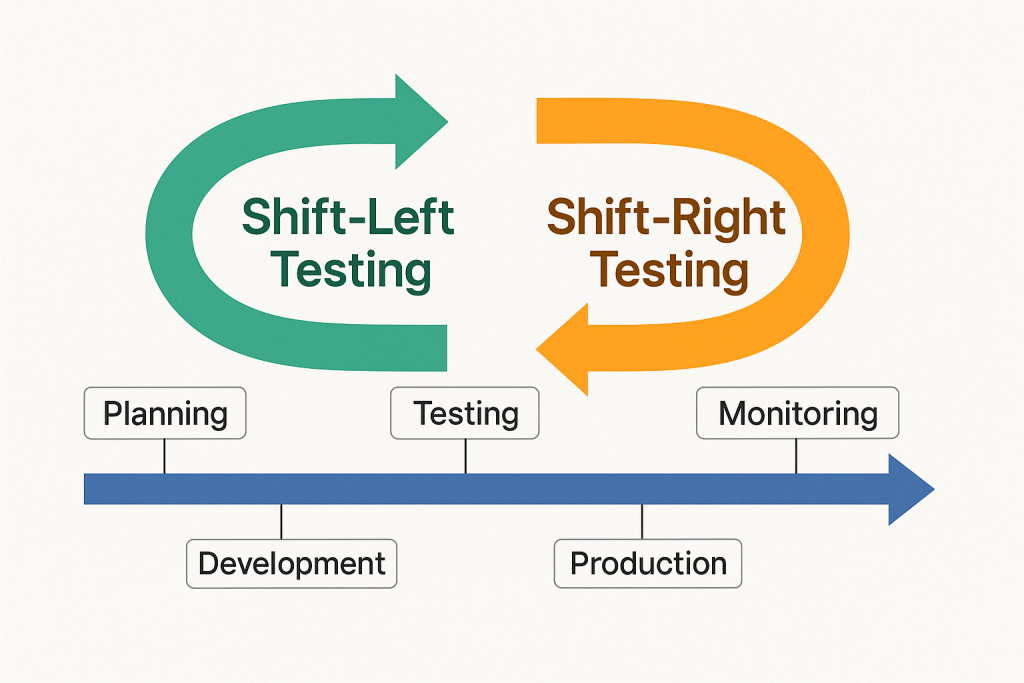
Imagine software development as a timeline — it starts with planning and ends with releasing the product to users.

  • Left side = Early stages like planning, designing, and coding
  • Right side = Later stages like deployment, user feedback, and maintenance

So when we say:

  • Shift-Left Testing ➜ Move testing earlier in the process
  • Shift-Right Testing ➜ Continue testing after release into production

🧭 Shift-Left Testing: Catching Bugs Early

What is it?
Shift-Left means testing begins before the software is fully built. It’s like checking your ingredients while cooking instead of waiting until the dish is finished.

Why is it useful?

  • Bugs are cheaper and easier to fix early
  • Developers get faster feedback
  • Improves product quality from the beginning

Common Practices:

  • Unit testing
  • Static code analysis
  • Test-driven development (TDD)
  • Continuous integration testing

Example:
A developer writes test cases while writing the code itself. If anything breaks, it’s caught immediately.


🧭 Shift-Right Testing: Keeping an Eye After Launch

What is it?
Shift-Right means testing continues after the software is released. Think of it as checking how your car performs on the road, not just in the garage.

Why is it useful?

  • Real users often behave differently than testers
  • Helps monitor performance in real-world conditions
  • Allows testing for scalability, reliability, and security

Common Practices:

  • A/B testing
  • Real user monitoring (RUM)
  • Synthetic testing
  • Chaos engineering

Example:
A website team monitors how users interact with a new feature after it’s live. If something slows down, they catch and fix it quickly.


🔍 Shift-Left vs Shift-Right: What’s the Difference?

FeatureShift-Left TestingShift-Right Testing
Focus TimeEarly (during development)Late (after release)
Main GoalPrevent bugs earlyDetect issues in production
Tools UsedUnit tests, CI pipelinesMonitoring, A/B testing
Feedback FromDevelopers, QA teamsEnd users, system logs

✅ Which One Should You Use?

Both!
The best teams use Shift-Left to build quality and Shift-Right to ensure reliability in the real world.

Just like a good chef tastes while cooking (left) and gets feedback after serving (right), a smart software team tests both before and after release.


🧠 Final Thoughts

Shift-Left and Shift-Right testing aren’t buzzwords — they’re smart strategies to create better, faster, and safer software. By adopting both, you catch problems early and keep learning from real-world use.

Quality isn’t just a step — it’s a journey from start to finish.

Top QA Interview Questions and Answers for Freshers

Starting a career in QA? Interviews can be easy if you prepare well. Here are the most common questions and answers you’ll likely face in a QA interview. All explained in a simple way for anyone to understand.


1. What is QA (Quality Assurance)?

Answer:
QA is the process of checking if the software is made correctly and meets the required quality. It helps prevent bugs and problems.


2. What is Software Testing?

Answer:
Testing is the process of finding mistakes (bugs) in software and making sure it works properly.


3. What is the difference between QA and Testing?

Answer:
QA is about improving the process to avoid bugs.
Testing is about finding bugs in the software.


4. What is a Bug?

Answer:
A bug is a mistake or problem in the software that makes it work in the wrong way.


5. What is a Test Case?

Answer:
A test case is a set of steps written to check if a part of the software works as expected.


6. What is Manual Testing?

Answer:
Manual testing is when a person checks the software without using any tools or scripts.


7. What is Automation Testing?

Answer:
Automation testing uses tools or scripts to test software automatically.


8. What is SDLC?

Answer:
SDLC (Software Development Life Cycle) is the step-by-step process of making software, like planning, building, testing, and releasing.


9. What is STLC?

Answer:
STLC (Software Testing Life Cycle) is the process followed to test the software, including planning, designing test cases, testing, and reporting bugs.


10. What is Regression Testing?

Answer:
It means testing old features again after changes to make sure nothing is broken.


11. What is Smoke Testing?

Answer:
A quick check to see if the main functions of the software are working or not.


12. What is Sanity Testing?

Answer:
It is a basic test to make sure new changes or bug fixes are working properly.


13. What is the difference between Smoke and Sanity Testing?

Answer:

  • Smoke testing checks basic functions after a new build.
  • Sanity testing checks small changes or bug fixes.

14. What is Functional Testing?

Answer:
It checks if the software features work as expected.


15. What is Non-Functional Testing?

Answer:
It checks how well the software performs, like speed, load time, and security.


16. What is a Test Plan?

Answer:
A test plan is a document that explains how testing will be done—what to test, how to test, and who will test.


17. What is a Test Scenario?

Answer:
A test scenario is a high-level idea of what to test, without step-by-step details.


18. What is the difference between a Test Case and a Test Scenario?

Answer:

  • Test Case = Detailed steps to test something
  • Test Scenario = General idea of what to test

19. What tools are used in QA?

Answer:
Some common tools are:

  • JIRA – for tracking bugs
  • Selenium – for automation testing
  • Postman – for API testing

20. Why do you want to work in QA?

Answer:
Because I like finding and solving problems. I want to make sure software is bug-free and users are happy.


🎯 Final Tip for Freshers:

Interviewers care more about how clearly you explain things than using big words. Stay calm, be honest, and show your eagerness to learn.

How Automating Web Browsers with Selenium and C# in VS Code Using Cursor AI Assistant

Automation is transforming the software development process—making testing faster, reducing repetitive tasks, and improving productivity. In this guide, we’ll explore how to automate web browsers using Selenium with C# inside Visual Studio Code, and more specifically, how to boost your workflow using the Cursor AI assistant (v1.1.5).

🧠 Cursor is an AI-powered coding assistant embedded directly into VS Code. It helps write, explain, and debug code faster using natural language prompts.


🔧 Prerequisites

Before diving in, make sure the following tools are installed:

  • .NET SDK (6.0 or later)Download
  • Visual Studio Code (v1.96.2 or later)Download
  • Cursor AI extension (v1.1.5) – Installed from https://www.cursor.so/
  • Google Chrome and ChromeDriver
  • NuGet packages for Selenium

🚀 Step 1: Create a New C# Project with Cursor

Open VS Code with Cursor enabled and type:

dotnet new console -n SeleniumAutomation
cd SeleniumAutomation

Ask Cursor:
💬 “Add Selenium dependencies to this C# project using NuGet.”

It will auto-generate the correct command:

💻 Step 2: Automate a Browser Using Selenium

Open Program.cs, and type this prompt into Cursor:

💬 “Create a sample Selenium script in C# that opens Chrome, searches on Google, and closes the browser.”

Cursor will generate code similar to this:

using OpenQA.Selenium;
using OpenQA.Selenium.Chrome;
using System;
using System.Threading;

class Program
{
    static void Main()
    {
        using var driver = new ChromeDriver();
        driver.Navigate().GoToUrl("https://www.google.com");

        var searchBox = driver.FindElement(By.Name("q"));
        searchBox.SendKeys("Selenium with C#");
        searchBox.SendKeys(Keys.Enter);

        Thread.Sleep(3000);
        driver.Quit();
    }
}

🧠 Step 3: Debug & Explain with Cursor

Highlight any part of your code and ask:

💬 “Explain this line.”
💬 “How can I wait until the element is visible?”
💬 “Convert this to use WebDriverWait.”

Cursor will rewrite or enhance the logic with contextual explanations.


🖱 Bonus: Automating Actions via JavaScript

Want to simulate mouse interaction or click buttons? Try:

IJavaScriptExecutor js = (IJavaScriptExecutor)driver;
js.ExecuteScript("document.querySelector('input[name=q]').click();");

You can prompt Cursor:
💬 “Use JavaScriptExecutor to click a button by CSS selector.”

You can prompt Cursor:
💬 “Use JavaScriptExecutor to click a button by CSS selector.”


🧪 Cursor for Test Automation Engineers

Cursor can also:

  • Suggest NUnit test structure
  • Generate test classes from comments
  • Refactor repeated Selenium actions into reusable methods
  • Provide answers from docs directly in VS Code

✅ Benefits of Using Cursor with Selenium in VS Code

FeatureBenefit
Code generationFaster setup of boilerplate Selenium scripts
Auto-debuggingFixes C# errors and Selenium exceptions instantly
Natural language supportReduces context switching—write code by asking
Seamless integrationStays inside VS Code, no need for external tools

🧩 Conclusion

Combining Selenium, C#, and Cursor AI inside VS Code creates a supercharged automation workflow. Whether you’re a QA engineer or a developer, this setup will save hours, reduce complexity, and allow you to test smarter—not harder.

Top 10 AI-Powered Testing Tools in 2025

Artificial Intelligence (AI) continues to redefine how we approach software testing. In 2025, AI-driven tools don’t just automate tests—they intelligently generate, maintain, and optimize them. These tools help QA teams deliver faster, reduce errors, and gain deeper insights. Here’s a list of the top 10 AI-powered testing tools in 2025, each handpicked for its innovation and real-world impact.


1. Testim by Tricentis

Best for: UI and functional testing with self-healing capabilities
Testim leverages machine learning to accelerate authoring, execution, and maintenance of automated tests. In 2025, it features improved self-healing tests, seamless CI/CD integrations, and better analytics for root cause analysis—making it a favorite for fast-paced Agile teams.
Link: https://www.testim.io


2. Katalon Studio

Best for: End-to-end testing for web, mobile, API, and desktop
Katalon’s AI engine identifies flaky tests, suggests optimal test suites, and automates test creation. The 2025 edition includes visual testing, advanced smart wait, and AI-generated scripts—enhancing test reliability and efficiency.
Link: https://katalon.com


3. Applitools

Best for: Visual AI testing
Applitools uses Visual AI to detect UI bugs that traditional tools often miss. It now supports smart diffing, layout-based comparison, and AI-driven test maintenance, ensuring your interfaces stay pixel-perfect across browsers and screen sizes.
Link: https://applitools.com


4. Mabl

Best for: Intelligent web automation with cloud-native support
Mabl blends low-code test creation with AI-powered insights and test healing. It automatically adapts to UI changes, provides deep performance analysis, and generates test coverage metrics through intelligent data collection.
Link: https://www.mabl.com


5. Functionize

Best for: Scalable enterprise test automation
Functionize combines machine learning and natural language processing to allow test creation from plain English. Its AI ensures test cases adapt automatically to application changes, making it ideal for large, complex applications.
Link: https://www.functionize.com


6. Test.AI

Best for: AI bots for user behavior simulation
Test.AI uses AI agents to mimic human user actions and detect issues at scale. Its intelligent crawlers explore apps, detect UI bugs, and improve test coverage by learning behavior patterns, without needing traditional test scripts.
Link: https://test.ai


7. ACCELQ

Best for: Continuous testing with AI-driven planning
ACCELQ uses predictive analytics and natural language test modeling to streamline test planning and automation. Its no-code platform is ideal for business users and QA engineers alike, enabling quick adaptation to change.
Link: https://www.accelq.com


8. Perfecto

Best for: Cloud-based mobile and web app testing
Perfecto integrates AI for faster debugging, flaky test detection, and smart analytics. Its cloud platform supports real-device testing and parallel executions for optimized test cycles.
Link: https://www.perfecto.io


9. TestCraft

Best for: Codeless Selenium-based test automation
TestCraft combines visual test creation with AI that updates test paths automatically. It’s especially useful for teams using Selenium who want to reduce maintenance and gain test resilience across UI changes.
Link: https://www.testcraft.io


10. Virtuoso

Best for: AI-enhanced end-to-end testing
Virtuoso enables testers to create scripts using plain English, with AI handling DOM scanning, dynamic data handling, and test self-healing. It reduces testing complexity while increasing efficiency for fast-moving teams.
Link: https://www.virtuoso.qa

11. TestRigor (Bonus)

Best for: Plain English end-to-end testing for web, mobile, and APIs
TestRigor enables writing test cases in natural language without needing to deal with code, locators, or XPaths. Its AI engine automatically adapts to UI changes and identifies elements based on human-readable text, reducing flakiness. The 2025 version supports web, mobile, desktop, and API testing from a single platform, all integrated with CI/CD workflows and parallel execution in the cloud.
Link: https://testrigor.com


✅ Final Thoughts

The rise of AI in testing has brought a new level of efficiency, intelligence, and scalability. Whether you’re looking to reduce test maintenance, speed up releases, or improve test reliability, these tools offer the capabilities to transform your QA strategy in 2025 and beyond.

When Small Bugs Become Big Problems: The True Cost of Poor Software Quality

Introduction

Have you ever clicked a button on a website and nothing happened? Or maybe an app closed by itself? These are bugs – small mistakes in software. But while they may look minor, the effect they can have on a business is massive.

In this blog, we’ll show how a simple bug can lead to money loss, angry customers, and even business failure.


💥 What is a Bug?

A bug is a problem in a computer program that makes it behave the wrong way. For example:

  • A payment page doesn’t load
  • A mobile app crashes
  • A wrong price shows up in your cart

These issues may look technical, but they cause serious business problems.


📊 How Bugs Affect Business

Let’s take a look at this chart:

Explanation:

  • Revenue Loss: If people can’t pay, the business loses money.
  • Brand Damage: Users lose trust in your product.
  • Customer Churn: Frustrated customers leave.
  • Operational Cost: More time and money spent fixing bugs.
  • Compliance Risk: Bugs in sensitive systems can lead to legal trouble.

🧾 Real-Life Bug Disasters

🚨 Knight Capital (USA)

In 2012, a bug in their trading software cost them $440 million in 45 minutes. The company never recovered.

🛒 Amazon Sellers (UK)

A pricing error caused products to be listed for £0.01. Some sellers lost their entire stock for almost nothing.

📱 Facebook Ads

In 2020, advertisers were charged extra due to a system bug. Facebook had to issue refunds and lost trust for a while.

🧠 Not All Bugs Are Equal

Some bugs are small. Some are dangerous. Let’s compare:

BugLooks Small?Business Risk
App crashes onceYesLow
Submit button doesn’t workMaybeHigh
Wrong tax addedNoVery High

✅ How to Prevent Serious Bug Impact

  1. Test Early: Don’t wait until launch. Start testing when development begins.
  2. Automate Testing: Use tools to test common features every time you update.
  3. Talk with Business Teams: Developers should understand which parts of the app matter most for business.
  4. Fix Fast, Learn Faster: When a bug happens, fix it quickly and learn from it.

Here is a simple bar graph showing how software bugs can affect different areas of a business. The higher the bar, the greater the impact.

🎯 Final Words

Even one small bug can damage a brand or cost a company millions. That’s why businesses must treat bugs seriously – not just as a technical problem, but a business threat.

👨‍💻 Remember: A bug in software is a hole in your business.

When Everyone Owns Quality: Building a Culture of Test Champions

Introduction

“We’ll let QA find it” is a mindset that dooms product quality before a single line of code is written. When QA becomes the catch-all for defects, quality turns into a siloed activity, and the whole team loses ownership of outcomes. In high-performing organizations, QA isn’t a final gatekeeper—it’s an integrated partner and feedback engine that helps everyone build better software from day one.

Why “QA Will Catch It” Never Works

  1. Engineers abdicate responsibility
    When developers believe “QA will find it,” they’re less motivated to write clean, well-tested code. Bugs slip through earlier phases, and the cycle of defect discovery becomes reactive rather than preventive.
  2. Design flaws go downstream
    Flawed or ambiguous requirements aren’t questioned up front; they’re simply passed on. QA testers end up shouldering the burden of discovery and clarification, delaying projects and creating friction.
  3. Quality becomes siloed
    If only one team “owns” quality, collaboration breaks down. Developers, designers, product managers and QA operate in isolation instead of working toward a shared goal.
  4. QA overloaded—and blamed
    With all defects funneled to QA, testing teams become overwhelmed, deadlines slip, and QA is blamed for “not catching enough.” Morale drops, turnover rises, and true root causes are never addressed.

The Mirror Effect: What QA Reveals

QA isn’t just a bug-finding engine; it’s a mirror reflecting how your team really works:

  • Process weaknesses surface as repetitive, low-value defects.
  • Communication gaps show up as misunderstandings between dev, design and product.
  • Insufficient test coverage highlights where standards and practices are unclear.
  • Tooling or environment issues become obvious when tests fail for non-functional reasons.

Seeing these reflections early helps teams course-correct, automate where needed, and invest in the right practices.

Traits of High-Performing Teams

What do top teams do differently?

  1. Treat QA as a partner, not a gatekeeper
    • Involve QA in backlog grooming and design reviews
    • Collaborate on acceptance criteria and automated test suites
  2. Build quality in, end-to-end
    • Adopt TDD/BDD or other test-first approaches
    • Automate unit, integration and end-to-end tests
    • Use static analysis, linters and code reviews before QA handoff
  3. Share ownership of deliverables
    • Define “done” to include successful automated tests
    • Rotate testing responsibilities among devs, designers and QA
    • Track quality metrics (defect density, escape rate) as a team KPI
  4. Use QA as a feedback engine
    • Surface insights from test runs to drive refactoring
    • Prioritize defects by business impact, not by who “owns” them
    • Run regular retrospectives focused on reducing systemic issues

Practical Steps to Shift Mindset

  1. Kick off each sprint with a joint QA/dev workshop to clarify scope, edge cases and test strategy.
  2. Embed “QA champions” on each dev pod who write and maintain automation alongside developers.
  3. Define shared quality metrics in your CI/CD dashboard—celebrate when escape rates drop.
  4. Promote cross-training: developers write exploratory tests; QA learns to author unit tests.
  5. Hold collective post-mortems when significant bugs escape—focus on process fixes, not finger-pointing.

Conclusion

Quality isn’t “QA’s job”—it’s everyone’s job. QA doesn’t exist to catch the mistakes everyone else misses; it exists to reflect the strengths and gaps in your process, tools and collaboration. When you stop blaming QA and start treating quality as a shared commitment, you’ll ship faster, delight users more consistently, and build a culture of continuous improvement.